I am using ArcGIS Experience Builder.
I'm working on a React component that toggles visibility of map layers in an Esri map. My widget works perfectly when I hardcode the layers configuration, but fails to add layers when I load the configuration from a config.json file.
Working Code Example:
import { React, AllWidgetProps } from 'jimu-core';
import { JimuMapViewComponent, JimuMapView } from 'jimu-arcgis';
import FeatureLayer from 'esri/layers/FeatureLayer';
import { IMConfig } from '../config';
const { useState, useEffect } = React;

const layersConfig = [
  {
    name: "Layer 1",
    url: "https://example.com/arcgis/rest/services/Layer1/MapServer/0",
  },
  {
    name: "Layer 2",
    url: "https://example.com/arcgis/rest/services/Layer2/MapServer/0",
  }
];

const Widget = (props: AllWidgetProps<IMConfig>) => {
  const [jimuMapView, setJimuMapView] = useState<JimuMapView>(null);
  const [layers, setLayers] = useState([]);

  useEffect(() => {
    if (props.config && props.config.layers) { //not necessary in this case
      const initialLayers = layersConfig.map(layerConfig => ({
        ...layerConfig,
        layer: new FeatureLayer({
          url: layerConfig.url,
          title: layerConfig.name,
          visible: false
        })
      }));
      console.log('Initial layers:', initialLayers);
      setLayers([...initialLayers]);
    }
  }, [config.props]); //also not necessary in the working sample

  const activeViewChangeHandler = (jmv: JimuMapView) => {
    if(jmv) {
      setJimuMapView(jmv);
      layers.forEach(({ layer }) => jmv.view.map.add(layer));
    }
  };

  const toggleLayerVisibility = (index) => {
    const newLayers = layers.map((layer, idx) => {
      if (idx === index) {
        layer.layer.visible = !layer.layer.visible;
      }
      return layer;
    });
    setLayers(newLayers);
  };

  return (
    <div>
      {props.useMapWidgetIds && props.useMapWidgetIds.length === 1 && (
        <JimuMapViewComponent props.useMapWidgetId={props.useMapWidgetIds[0]} onActiveViewChange={activeViewChangeHandler} />
      )}
      <div>
        {layers.map((layer, index) => (
          <label key={index}>
            <input
              type="checkbox"
              checked={layer.layer.visible}
              onChange={() => toggleLayerVisibility(index)}
            />
            {layer.name}
          </label>
        ))}
      </div>
    </div>
  );
};

export default Widget;
Non-Working Code (using config.json):
// Similar to the above, but `layersConfig` is replaced with `props.config.layers`
useEffect(() => {
    if (props.config && props.config.layers) {
      const initialLayers = props.config.layers.map(layerConfig => ({ //<--- This changed!
        ...layerConfig,
        layer: new FeatureLayer({
          url: layerConfig.url,
          title: layerConfig.name,
          visible: false
        })
      }));
      console.log('Initial layers:', initialLayers);
      setLayers([...initialLayers]);
    }
  }, [props.config]);
config.json:
{
  "layers": [
    {
      "name": "Layer 1",
      "url": "hidden",
    },
    {
      "name": "Layer 2",
      "url": "hidden"
    }
  ]
}
config.ts:
import { ImmutableObject } from 'seamless-immutable';

export interface LayerConfig {
  name: string;
  url: string;
}

export interface Config {
  layers: LayerConfig[];
}

export type IMConfig = ImmutableObject<Config>;
Error Message:
[esri.WebMap] #add() The item being added is not a Layer or a Promise that resolves to a Layer.
This error occurs at the line where I try to add layers to the map:
layers.forEach(({ layer }) => jmv.view.map.add(layer));
Extra:
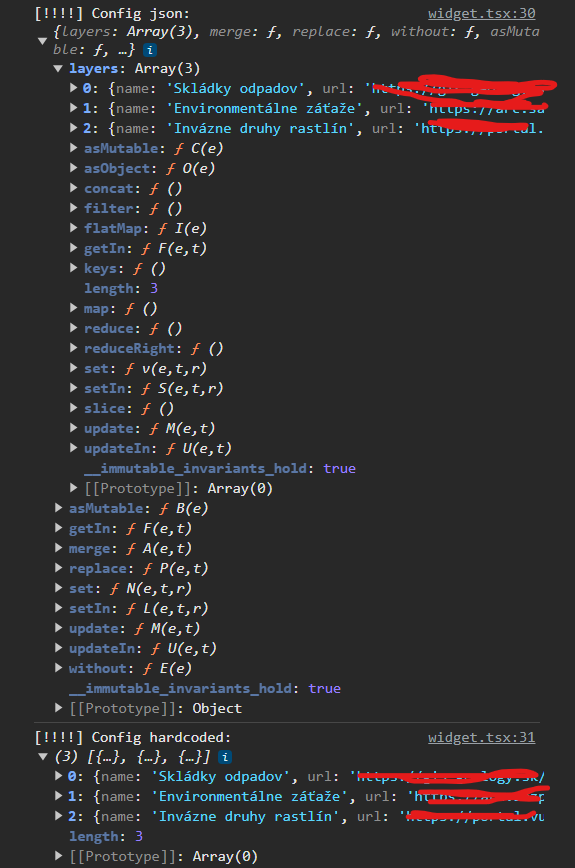
Here is initial layers for the working sample:
https://i.sstatic.net/8ABzS7TK.png)
And for the non-working:
https://i.sstatic.net/XIKFGj3c.png)
1. Checked the URLs in the config file to ensure they are correct and accessible.
2. Added logs to various points in the component to ensure the data is being loaded and state changes are occurring as expected.
3. Ensured the component is correctly re-rendering on state changes.
Please help I've been trying to figure it out by different means for the past 10 hours...
Edit:
Config from both working and non-working samples: