I have had a desire to set a switch/flag in geoprocessing scripts that log at a level corresponding to the setting in the server.
The 'Message Level' setting can be accessed using the python api.
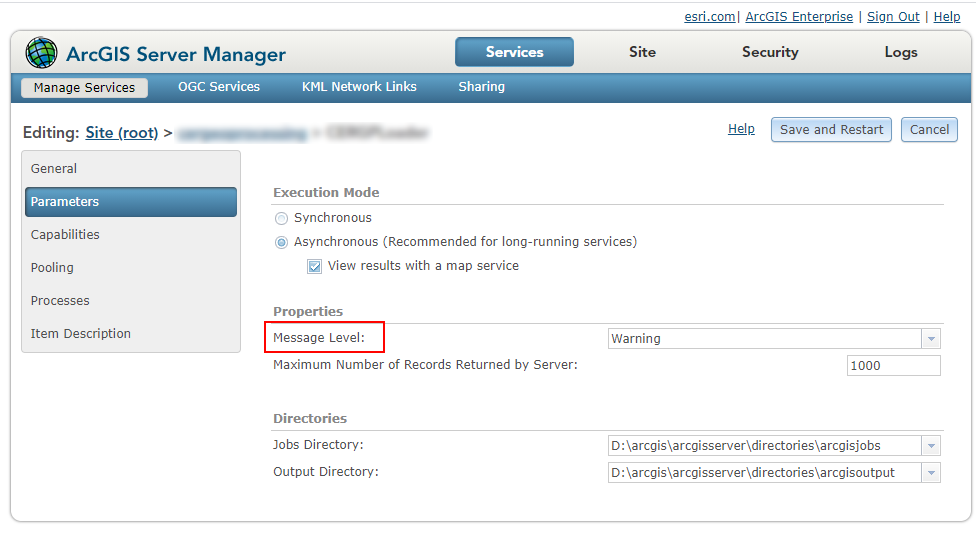
I accomplished this via a small function as follows.
<SPAN class="keyword token">from</SPAN> arcgis<SPAN class="punctuation token">.</SPAN>gis <SPAN class="keyword token">import</SPAN> GIS
<SPAN class="keyword token">def</SPAN> <SPAN class="token function">get_server_loglevel</SPAN><SPAN class="punctuation token">(</SPAN>checkservicename<SPAN class="punctuation token">)</SPAN><SPAN class="punctuation token">:</SPAN>
infolevel <SPAN class="operator token">=</SPAN> None <SPAN class="string token">"""set infolevel to None and handle None separately
or set infolevel to a default - e.g. 'info' """</SPAN>
<SPAN class="keyword token">for</SPAN> folder <SPAN class="keyword token">in</SPAN> servicesdirectory<SPAN class="punctuation token">.</SPAN>folders<SPAN class="punctuation token">:</SPAN>
folder_services <SPAN class="operator token">=</SPAN> servicesdirectory<SPAN class="punctuation token">.</SPAN>list<SPAN class="punctuation token">(</SPAN>folder<SPAN class="operator token">=</SPAN>folder<SPAN class="punctuation token">)</SPAN>
<SPAN class="keyword token">for</SPAN> folderservice <SPAN class="keyword token">in</SPAN> folder_services<SPAN class="punctuation token">:</SPAN>
service <SPAN class="operator token">=</SPAN> folderservice<SPAN class="punctuation token">.</SPAN>service
servicename <SPAN class="operator token">=</SPAN> service<SPAN class="punctuation token">.</SPAN>properties<SPAN class="punctuation token">.</SPAN>serviceName
<SPAN class="keyword token">if</SPAN> servicename <SPAN class="operator token">==</SPAN> checkservicename<SPAN class="punctuation token">:</SPAN>
<SPAN class="comment token"># match the service name from the script to the one in the server</SPAN>
<SPAN class="keyword token">if</SPAN> <SPAN class="string token">'showMessages'</SPAN> <SPAN class="keyword token">in</SPAN> service<SPAN class="punctuation token">.</SPAN>properties<SPAN class="punctuation token">.</SPAN>properties<SPAN class="punctuation token">:</SPAN>
infolevel <SPAN class="operator token">=</SPAN> service<SPAN class="punctuation token">.</SPAN>properties<SPAN class="punctuation token">.</SPAN>properties<SPAN class="punctuation token">.</SPAN>showMessages
<SPAN class="keyword token">return</SPAN> infolevel
<SPAN class="comment token"># obtain the gis (portal) object </SPAN>
gis <SPAN class="operator token">=</SPAN> GIS<SPAN class="punctuation token">(</SPAN>r<SPAN class="string token">'https://fully.qualified.domain.name/portal'</SPAN><SPAN class="punctuation token">,</SPAN> <SPAN class="string token">'portaladmin'</SPAN><SPAN class="punctuation token">,</SPAN> <SPAN class="string token">'Passw0rd'</SPAN><SPAN class="punctuation token">,</SPAN> verify_cert<SPAN class="operator token">=</SPAN><SPAN class="token boolean">False</SPAN><SPAN class="punctuation token">)</SPAN>
<SPAN class="comment token"># call the federated hosting server</SPAN>
federatedserver <SPAN class="operator token">=</SPAN> gis<SPAN class="punctuation token">.</SPAN>admin<SPAN class="punctuation token">.</SPAN>servers<SPAN class="punctuation token">.</SPAN>get<SPAN class="punctuation token">(</SPAN>role<SPAN class="operator token">=</SPAN><SPAN class="string token">"HOSTING_SERVER"</SPAN><SPAN class="punctuation token">)</SPAN><SPAN class="punctuation token">[</SPAN><SPAN class="number token">0</SPAN><SPAN class="punctuation token">]</SPAN>
<SPAN class="comment token"># get the servicesdirectory object.</SPAN>
servicesdirectory <SPAN class="operator token">=</SPAN> federatedserver<SPAN class="punctuation token">.</SPAN>content
serverloglevel <SPAN class="operator token">=</SPAN> get_server_loglevel<SPAN class="punctuation token">(</SPAN>servicename<SPAN class="punctuation token">,</SPAN> servicesdirectory<SPAN class="punctuation token">)</SPAN>
<SPAN class="comment token"># use serverloglevel in the script to log accordingly.</SPAN>The use for this may be a bit unconventional but it has helped to pass control of the 'log level' to the geoprocessing script so log files can also be written based on the server log level.
<SPAN class="keyword token">import</SPAN> logging
general_loglevels <SPAN class="operator token">=</SPAN> <SPAN class="punctuation token">{</SPAN><SPAN class="string token">'Error'</SPAN><SPAN class="punctuation token">:</SPAN><SPAN class="string token">'ERROR'</SPAN><SPAN class="punctuation token">,</SPAN> <SPAN class="string token">'Warning'</SPAN><SPAN class="punctuation token">:</SPAN> <SPAN class="string token">'WARNING'</SPAN><SPAN class="punctuation token">,</SPAN> <SPAN class="string token">'Info'</SPAN><SPAN class="punctuation token">:</SPAN> <SPAN class="string token">'INFO'</SPAN><SPAN class="punctuation token">}</SPAN>
<SPAN class="comment token"># https://docs.python.org/3/library/logging.html#logging-levels</SPAN>
<SPAN class="keyword token">if</SPAN> serverloglevel <SPAN class="keyword token">in</SPAN> general_loglevels<SPAN class="punctuation token">:</SPAN>
loglevel <SPAN class="operator token">=</SPAN> general_loglevels<SPAN class="punctuation token">[</SPAN>serverloglevel<SPAN class="punctuation token">]</SPAN>
<SPAN class="keyword token">else</SPAN><SPAN class="punctuation token">:</SPAN>
loglevel <SPAN class="operator token">=</SPAN> <SPAN class="string token">'DEBUG'</SPAN>
logger <SPAN class="operator token">=</SPAN> logging<SPAN class="punctuation token">.</SPAN>getLogger<SPAN class="punctuation token">(</SPAN><SPAN class="string token">"GP Service"</SPAN><SPAN class="punctuation token">)</SPAN>
level <SPAN class="operator token">=</SPAN> logging<SPAN class="punctuation token">.</SPAN>getLevelName<SPAN class="punctuation token">(</SPAN>loglevel<SPAN class="punctuation token">)</SPAN>
logger<SPAN class="punctuation token">.</SPAN>setLevel<SPAN class="punctuation token">(</SPAN>level<SPAN class="punctuation token">)</SPAN><SPAN class="line-numbers-rows"><SPAN></SPAN><SPAN></SPAN><SPAN></SPAN><SPAN></SPAN><SPAN></SPAN><SPAN></SPAN><SPAN></SPAN><SPAN></SPAN><SPAN></SPAN><SPAN></SPAN><SPAN></SPAN><SPAN></SPAN><SPAN></SPAN><SPAN></SPAN><SPAN></SPAN></SPAN>

