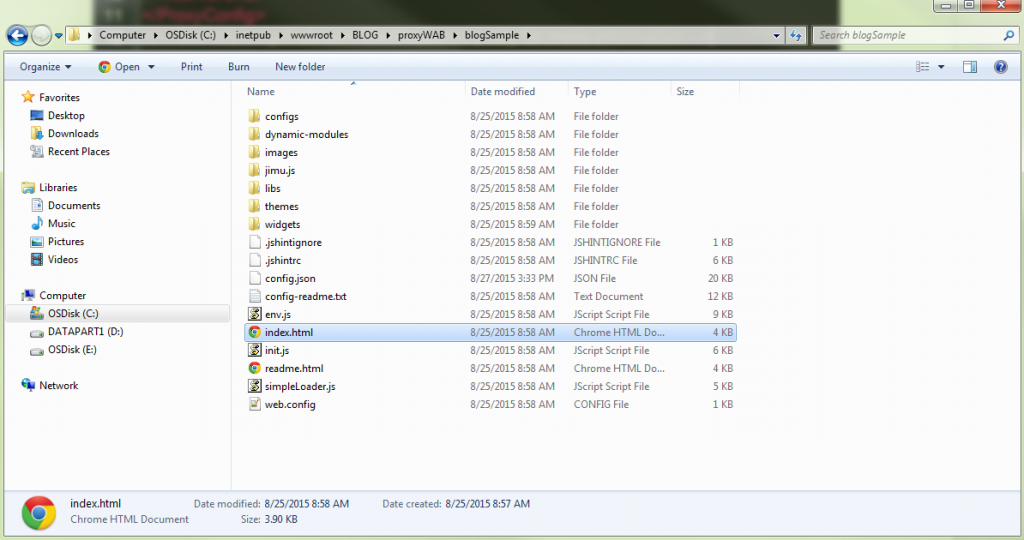
Upozornění: Tento blog předpokládá, že jste již stáhli, hostovali a správně nakonfigurovali proxy. Nejste si jisti, zda jste to udělali? Žádný problém; stačí postupovat podle pokynů HERE<\/STRONG> <\/A>.<\/EM><\/P>Pro shrnutí, zde jsou některé důvody pro nastavení proxy s aplikací Web AppBuilder.Přístup k zabezpečeným službám s autentizací založenou na tokenu<\/LI>Přístup přes domény pro vaše zdroje<\/LI>Požadavek přesahuje 2 048 znaků<\/LI>Používání přihlášení O-Auth 2.0 aplikace<\/LI>Umožňuje protokolování<\/LI>Omezení rychlosti založené jak na zdroji, tak na refereru<\/LI><\/UL><\/BLOCKQUOTE>Abychom si byli všichni na stejné vlně, vyjasněme si situaci. V rámci Developer Edition Web AppBuilder byla vytvořena skvělá aplikace. Zkontrolujte, zda byla aplikace stažena a nasazena na webový server.Dvě věci jsou zabezpečené:Webová mapa ArcGIS Online sdílená s organizací<\/LI>Mapová služba ArcGIS for Server zabezpečená pomocí vestavěných tokenů ArcGIS Serveru<\/LI><\/OL><\/BLOCKQUOTE>V tomto příkladu budeme mít při spuštění aplikace dvě výzvy: první je autentizace zabezpečené webové mapy a druhá zabezpečení mapové služby ArcGIS for Server.Když otevřeme nástroje pro vývojáře a podíváme se na záložku Síť (Network), vidíme, že odpověď vrací chybu 403 při přístupu k webové mapě ArcGIS Online. Je to proto, že anonymní uživatel nemá ve výchozím nastavení oprávnění k přístupu k tomuto zdroji.<\/A> výzva k zabezpečení webové mapy<\/P><\/DIV>U druhé výzvy vidíme v záložce Síť, že aplikace se nepodaří načíst službu a vrací chybu 499 token required. To nám říká, že pro přístup k obsahu musíme předat token.<\/A> výzva k zabezpečení mapové služby ArcGIS for Server<\/P><\/DIV>Dobře, teď jsme připraveni začít!1. Ve Windows Průzkumníku otevřete soubor "config.json" aplikace. <\/A>2. Na úplném spodku souboru je pohodlné místo pro přidání pravidla proxy do aplikace. <\/A>Parametr useProxy<\/STRONG> (Boolean) je ve výchozím nastavení nastaven na true. Pokud je nastaven na false, všechny požadavky nebudou používat proxy.Parametr url<\STRONG> (String) je volitelný a představuje URL umístění proxy. Když musí požadavek použít proxy pro Cross Domain požadavek nebo je požadavek větší než 2048 znaků, použije se tato proxy.Parametr alwaysUseProxy<\STRONG> (Boolean) je také volitelný a ve výchozím nastavení nastaven na false. Pokud je nastaven na true, všechny požadavky komunikující s REST endpointem budou používat proxy nastavenou v parametru url <\STRONG>.Parametr rules<\STRONG> (Object[]) je rovněž volitelný a pokud je nastaven, definuje konkrétní požadavky, které budou používat proxy.3. Protože máme dva zabezpečené zdroje, můžeme směrovat požadavky přes proxy k autentizaci. K tomu musíme do souboru config.json přidat některá pravidla proxy.<\A> pravidla proxy<\P><\DIV>První pravidlo je pro webovou mapu sdílenou s organizací a druhé pravidlo jest pro zabezpečenou službu ArcGIS for Server.Vlastnost urlPrefix<\EM> říká aplikaci, že když uvidí tento prefix v požadavku, použije proxy k přístupu ke zdroji. Vlastnost proxyUrl<\EM> říká aplikaci, kde se proxy nachází.Webové mapy mohou být sdíleny s organizací nebo vůbec nesdíleny. Použitím clientId a clientSecret můžeme autentizovat webovou mapu nebo zdroje uvnitř webové mapy. Pokud pracujete s hostovanou feature službou ArcGIS Online, musíte být vlastníkem této hostované feature služby pro autentizaci pomocí přihlášení aplikace.<\EM>
výzva k zabezpečení webové mapy<\/P><\/DIV>U druhé výzvy vidíme v záložce Síť, že aplikace se nepodaří načíst službu a vrací chybu 499 token required. To nám říká, že pro přístup k obsahu musíme předat token.
výzva k zabezpečení mapové služby ArcGIS for Server<\/P><\/DIV>Dobře, teď jsme připraveni začít!1. Ve Windows Průzkumníku otevřete soubor "config.json" aplikace.
pravidla proxy<\P><\DIV>První pravidlo je pro webovou mapu sdílenou s organizací a druhé pravidlo jest pro zabezpečenou službu ArcGIS for Server.Vlastnost urlPrefix<\EM> říká aplikaci, že když uvidí tento prefix v požadavku, použije proxy k přístupu ke zdroji. Vlastnost proxyUrl<\EM> říká aplikaci, kde se proxy nachází.Webové mapy mohou být sdíleny s organizací nebo vůbec nesdíleny. Použitím clientId a clientSecret můžeme autentizovat webovou mapu nebo zdroje uvnitř webové mapy. Pokud pracujete s hostovanou feature službou ArcGIS Online, musíte být
Při práci s obsahem zabezpečeným v ArcGIS Online (například zabezpečená webová mapa nebo zabezpečená hostovaná feature služba) se důrazně doporučuje použít client id a client secret k autentizaci. Pro služby hostované na ArcGIS for Server budeme používat uživatelské jméno a heslo ArcGIS for Server.<\EM>
Developer účetArcGIS Online účet
I set up the DotNet proxy on the same machine as my app.
I set up the application's config.json with one rule:
"httpProxy": { "useProxy": true, "alwaysUseProxy": false, "url": "", "rules": [{ "urlPrefix": "https://SERVER1/borOutreach", "proxyUrl": "https://SERVER1/DotNet/proxy.ashx" }] }<SPAN class="line-numbers-rows"><SPAN></SPAN><SPAN></SPAN><SPAN></SPAN><SPAN></SPAN><SPAN></SPAN><SPAN></SPAN><SPAN></SPAN><SPAN></SPAN><SPAN></SPAN></SPAN>
I set the proxy.config with one serverUrl:
<SPAN class="token tag"><SPAN class="token tag"><SPAN class="punctuation token"><</SPAN>serverUrls</SPAN><SPAN class="punctuation token">></SPAN></SPAN> <SPAN class="token tag"><SPAN class="token tag"><SPAN class="punctuation token"><</SPAN>serverUrl</SPAN> <SPAN class="attr-name token">url</SPAN><SPAN class="attr-value token"><SPAN class="punctuation token">=</SPAN><SPAN class="punctuation token">"</SPAN><A class="jive-link-external-small" href="https://community.esri.com/external-link.jspa?url=https%3A%2F%2FSERVER1%2FborOutreach" target="_blank">https://SERVER1/borOutreach</A><SPAN class="punctuation token">"</SPAN></SPAN> <SPAN class="attr-name token">matchAll</SPAN><SPAN class="attr-value token"><SPAN class="punctuation token">=</SPAN><SPAN class="punctuation token">"</SPAN>true<SPAN class="punctuation token">"</SPAN></SPAN><SPAN class="punctuation token">/></SPAN></SPAN> <SPAN class="token tag"><SPAN class="token tag"><SPAN class="punctuation token"></</SPAN>serverUrls</SPAN><SPAN class="punctuation token">></SPAN></SPAN><SPAN class="line-numbers-rows"><SPAN></SPAN><SPAN></SPAN><SPAN></SPAN></SPAN>
https://SERVER1/DotNet/proxy.ashx?ping returns
{ "Proxy Version": "1.1.2", "Configuration File": "OK", "Log File": "Not Exist/Readable"}
But https://SERVER1/DotNet/proxy.ashx?https://SERVER1/borOutreach?f=pjson fails to load anything, looking for simpleLoader.js , init.js, env.js etc. at https://SERVER1/DotNet/fileName.ext
If I swap out http://esri.com for https://SERVER1/borOutreach in config.json and proxy.config, it loads the (poorly formatted) Esri webpage.
I can't seem to figure out how to deploy my web app.
For me, it is still unclear what the following parameters are for my app:
yourDomainyourDomainNameyourSecuredService
I guess 'yourDomain' is "routeplannerpedestrianthesis". This is the domain I set in the Data Source URL (https://laptop-p9sbpmdc.routeplannerpedestrianthesis:3344/webbuilder ) in the settings of the web app. But if this is true, what is "yourDomainName", does this differ from "yourDomain"? In addition, I am also not sure what "yourSecuredService" could be. Below you can see my proxy.config file and my config.json file. Please let me know what I am doing wrong. For obvious reasons I deleted my ClientID, ClientSecret and username and password in the printscreen. In my webapp I make use of the Plan Route widget.
Bill, did you find an answer to this question? I believe I may be experiencing the same issue the proxy gets my into the web map fine, but i'm challenged for the arcgis login when running the analysis widget.
Thanks!
JP
Is there additional settings/config to get this working on an Enterprise 10.6x instance with Portal and Active Directory authentication?
I have the proxy working on a 10.3 instance with no Portal and simple ArcGIS Server User Store, but on this new server instance it continues to prompt with the login page.
I have so far: - installed the DotNet proxy files - created the Application in IIS - setup the serverUrl details in the proxy.config file using one of the ArcGIS user credentials (not an AD user) - the proxy URLs test successfully:
https://<my-server>/DotNet/proxy.ashx?https://my-server/portal/sharing/rest/content/items/<some itemID 1>
https://<my-server>/DotNet/proxy.ashx?https://my-server/portal/sharing/rest/content/items/<some itemID 2>
https://<my-server>/DotNet/proxy.ashx?https://my-server/arcgis/rest/services/<Folder Name>
So the proxy seems to be working, but it still fires the login page when hitting the web app?
Any ideas/suggestions would be greatly appreciated.
Hello,
After performing all the steps you mentioned, I am still getting popup for Login using Username Password. Screenshot - 09bb900de3a61f481b47527b1cf0b308 - Gyazo
My HttpProxy looks something like this.
and Proxy.config look like this.
<serverUrl url="http://geollect.maps.arcgis.com/sharing/rest" clientId="sdsdsdsddffCCuDcgfdgfg" clientSecret="dsdsdsdsdsdsds34e18gfgfgfgf" matchAll="true"/> <serverUrl url="http://utility.arcgisonline.com/arcgis/rest/services/Geometry/GeometryServer" username="username" password="password" matchAll="true" /> <serverUrl url="http://services.arcgis.com"clientId="sdsdsdsddffCCuDcgfdgfg"clientSecret="dsdsdsdsdsdsds34e18gfgfgfgf" matchAll="true"/> <serverUrl url="http://route.arcgis.com"clientId="sdsdsdsddffCCuDcgfdgfg"clientSecret="dsdsdsdsdsdsds34e18gfgfgfgf" matchAll="true" />Can you help me here?
Hi, Did you get anything that worked for you ?Please reply, It will be greatful
How did you resolve the pop up issue ?
If you get a popup message to sign-in, it's either the proxy didn't trigger for the request or you don't have permissions to access some portal items through the proxy. You need to narrow the problem by accessing the resources through the proxy directly to understand if it works or not -
https://#proxy-url/proxy.ashx#?#resource-url#
and always work with fiddler or the network tab in dev-tools, to examine the response.
When creating an app with client id+secret, you delegate access to Portal for that user who created that app. if Portal items are not owned by/shared with that user who created the dev app, you will still not be able to access these portal items with the client id + secret
Přihlášení členové mohou přispívat, sledovat aktualizace a další. Nový zde? Zaregistrujte si bezplatný účet.
Find useful guides, FAQs, and documents to help you navigate and make the most of Esri Community.