Numpy Snippets
Updates: 2016-09-09
This just a quick example of how to use existing arrays and export them to tables. In this case I will use arcpy functionality to produce a dBase file. Numpy can be used directly to produce text files as well.
To begin with:
- two arrays of X and Y values are created in the range 0-10 inclusive (ie 11 numbers),
- a data type is specified (dt)... in this case I assigned 'X' and 'Y' to the columns and specified a 64-bit floating point number,
- an array, XY, is create using some fancy zipping of the original arrays with the specified data type,
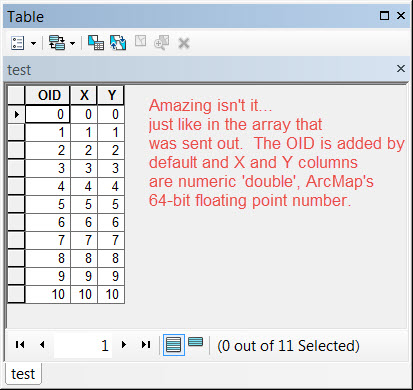
- ArcPy is imported, an output table is created using the data access module's NumPyArrayToTable.
- Now for the magical reveal
<SPAN class="operator token">>></SPAN><SPAN class="operator token">></SPAN> <SPAN class="keyword token">import</SPAN> numpy <SPAN class="keyword token">as</SPAN> np
<SPAN class="operator token">>></SPAN><SPAN class="operator token">></SPAN> X <SPAN class="operator token">=</SPAN> np<SPAN class="punctuation token">.</SPAN>arange<SPAN class="punctuation token">(</SPAN><SPAN class="number token">11</SPAN><SPAN class="punctuation token">)</SPAN> <SPAN class="comment token"># take some numbers</SPAN>
<SPAN class="operator token">>></SPAN><SPAN class="operator token">></SPAN> Y <SPAN class="operator token">=</SPAN> np<SPAN class="punctuation token">.</SPAN>arange<SPAN class="punctuation token">(</SPAN><SPAN class="number token">11</SPAN><SPAN class="punctuation token">)</SPAN> <SPAN class="comment token"># ditto</SPAN>
<SPAN class="operator token">>></SPAN><SPAN class="operator token">></SPAN> dt <SPAN class="operator token">=</SPAN> <SPAN class="punctuation token">[</SPAN><SPAN class="punctuation token">(</SPAN><SPAN class="string token">'X'</SPAN><SPAN class="punctuation token">,</SPAN><SPAN class="string token">'<f8'</SPAN><SPAN class="punctuation token">)</SPAN><SPAN class="punctuation token">,</SPAN><SPAN class="punctuation token">(</SPAN><SPAN class="string token">'Y'</SPAN><SPAN class="punctuation token">,</SPAN><SPAN class="string token">'<f8'</SPAN><SPAN class="punctuation token">)</SPAN><SPAN class="punctuation token">]</SPAN> <SPAN class="comment token"># specify a data type ie 64 bit floats</SPAN>
<SPAN class="operator token">>></SPAN><SPAN class="operator token">></SPAN>
<SPAN class="operator token">>></SPAN><SPAN class="operator token">></SPAN> XY <SPAN class="operator token">=</SPAN> np<SPAN class="punctuation token">.</SPAN>array<SPAN class="punctuation token">(</SPAN>zip<SPAN class="punctuation token">(</SPAN>X<SPAN class="punctuation token">,</SPAN>Y<SPAN class="punctuation token">)</SPAN><SPAN class="punctuation token">,</SPAN> dtype <SPAN class="operator token">=</SPAN> dt<SPAN class="punctuation token">)</SPAN> <SPAN class="comment token"># create a 2D array of floats</SPAN>
<SPAN class="operator token">>></SPAN><SPAN class="operator token">></SPAN> XY
array<SPAN class="punctuation token">(</SPAN><SPAN class="punctuation token">[</SPAN><SPAN class="punctuation token">(</SPAN><SPAN class="number token">0.0</SPAN><SPAN class="punctuation token">,</SPAN> <SPAN class="number token">0.0</SPAN><SPAN class="punctuation token">)</SPAN><SPAN class="punctuation token">,</SPAN> <SPAN class="punctuation token">(</SPAN><SPAN class="number token">1.0</SPAN><SPAN class="punctuation token">,</SPAN> <SPAN class="number token">1.0</SPAN><SPAN class="punctuation token">)</SPAN><SPAN class="punctuation token">,</SPAN> <SPAN class="punctuation token">(</SPAN><SPAN class="number token">2.0</SPAN><SPAN class="punctuation token">,</SPAN> <SPAN class="number token">2.0</SPAN><SPAN class="punctuation token">)</SPAN><SPAN class="punctuation token">,</SPAN> <SPAN class="punctuation token">(</SPAN><SPAN class="number token">3.0</SPAN><SPAN class="punctuation token">,</SPAN> <SPAN class="number token">3.0</SPAN><SPAN class="punctuation token">)</SPAN><SPAN class="punctuation token">,</SPAN> <SPAN class="punctuation token">(</SPAN><SPAN class="number token">4.0</SPAN><SPAN class="punctuation token">,</SPAN> <SPAN class="number token">4.0</SPAN><SPAN class="punctuation token">)</SPAN><SPAN class="punctuation token">,</SPAN>
<SPAN class="punctuation token">(</SPAN><SPAN class="number token">5.0</SPAN><SPAN class="punctuation token">,</SPAN> <SPAN class="number token">5.0</SPAN><SPAN class="punctuation token">)</SPAN><SPAN class="punctuation token">,</SPAN> <SPAN class="punctuation token">(</SPAN><SPAN class="number token">6.0</SPAN><SPAN class="punctuation token">,</SPAN> <SPAN class="number token">6.0</SPAN><SPAN class="punctuation token">)</SPAN><SPAN class="punctuation token">,</SPAN> <SPAN class="punctuation token">(</SPAN><SPAN class="number token">7.0</SPAN><SPAN class="punctuation token">,</SPAN> <SPAN class="number token">7.0</SPAN><SPAN class="punctuation token">)</SPAN><SPAN class="punctuation token">,</SPAN> <SPAN class="punctuation token">(</SPAN><SPAN class="number token">8.0</SPAN><SPAN class="punctuation token">,</SPAN> <SPAN class="number token">8.0</SPAN><SPAN class="punctuation token">)</SPAN><SPAN class="punctuation token">,</SPAN> <SPAN class="punctuation token">(</SPAN><SPAN class="number token">9.0</SPAN><SPAN class="punctuation token">,</SPAN> <SPAN class="number token">9.0</SPAN><SPAN class="punctuation token">)</SPAN><SPAN class="punctuation token">,</SPAN>
<SPAN class="punctuation token">(</SPAN><SPAN class="number token">10.0</SPAN><SPAN class="punctuation token">,</SPAN> <SPAN class="number token">10.0</SPAN><SPAN class="punctuation token">)</SPAN><SPAN class="punctuation token">]</SPAN><SPAN class="punctuation token">,</SPAN>
dtype<SPAN class="operator token">=</SPAN><SPAN class="punctuation token">[</SPAN><SPAN class="punctuation token">(</SPAN><SPAN class="string token">'X'</SPAN><SPAN class="punctuation token">,</SPAN> <SPAN class="string token">'<f8'</SPAN><SPAN class="punctuation token">)</SPAN><SPAN class="punctuation token">,</SPAN> <SPAN class="punctuation token">(</SPAN><SPAN class="string token">'Y'</SPAN><SPAN class="punctuation token">,</SPAN> <SPAN class="string token">'<f8'</SPAN><SPAN class="punctuation token">)</SPAN><SPAN class="punctuation token">]</SPAN><SPAN class="punctuation token">)</SPAN>
<SPAN class="operator token">>></SPAN><SPAN class="operator token">></SPAN>
<SPAN class="operator token">>></SPAN><SPAN class="operator token">></SPAN> <SPAN class="keyword token">import</SPAN> arcpy <SPAN class="comment token"># now lets do some arcpy stuff</SPAN>
<SPAN class="operator token">>></SPAN><SPAN class="operator token">></SPAN> out_table <SPAN class="operator token">=</SPAN> <SPAN class="string token">'c:/temp/test.dbf'</SPAN>
<SPAN class="operator token">>></SPAN><SPAN class="operator token">></SPAN> arcpy<SPAN class="punctuation token">.</SPAN>da<SPAN class="punctuation token">.</SPAN>NumPyArrayToTable<SPAN class="punctuation token">(</SPAN>XY<SPAN class="punctuation token">,</SPAN>out_table<SPAN class="punctuation token">)</SPAN>
<SPAN class="line-numbers-rows"><SPAN></SPAN><SPAN></SPAN><SPAN></SPAN><SPAN></SPAN><SPAN></SPAN><SPAN></SPAN><SPAN></SPAN><SPAN></SPAN><SPAN></SPAN><SPAN></SPAN><SPAN></SPAN><SPAN></SPAN><SPAN></SPAN><SPAN></SPAN><SPAN></SPAN><SPAN></SPAN></SPAN>
: -----------------------------------------------------
Now for the reveal...
: -----------------------------------------------------
Bring it back you say? Nothing could be easier.
>>> in_array = arcpy.da.TableToNumPyArray(out_table,['OID','X','Y'])
>>> in_array
array([(0, 0.0, 0.0), (1, 1.0, 1.0), (2, 2.0, 2.0), (3, 3.0, 3.0),
(4, 4.0, 4.0), (5, 5.0, 5.0), (6, 6.0, 6.0), (7, 7.0, 7.0),
(8, 8.0, 8.0), (9, 9.0, 9.0), (10, 10.0, 10.0)],
dtype=[('OID', '<i4'), ('X', '<f8'), ('Y', '<f8')])
<SPAN class="line-numbers-rows"><SPAN></SPAN><SPAN></SPAN><SPAN></SPAN><SPAN></SPAN><SPAN></SPAN><SPAN></SPAN><SPAN></SPAN></SPAN>: -----------------------------------------------------
Out to *.csv you say? Too easy (nothing fancy this time...just the numbers but formatted a bit).
0, 0.00, 0.00
1, 1.00, 1.00
2, 2.00, 2.00
3, 3.00, 3.00
4, 4.00, 4.00
5, 5.00, 5.00
6, 6.00, 6.00
7, 7.00, 7.00
8, 8.00, 8.00
9, 9.00, 9.00
10, 10.00, 10.00
<SPAN class="line-numbers-rows"><SPAN></SPAN><SPAN></SPAN><SPAN></SPAN><SPAN></SPAN><SPAN></SPAN><SPAN></SPAN><SPAN></SPAN><SPAN></SPAN><SPAN></SPAN><SPAN></SPAN><SPAN></SPAN><SPAN></SPAN></SPAN>
So NumPy and ArcPy do play 'nice' together. Experiment a bit. More later.
