Recently, I was asked to create a tool that offers cascading drop down lists that enables the user to select a municipality and the selection of a municipality should define the list of communes for the second list and selecting a commune should fill the list of districts. A script tool is easy to create and together with the validation code you can implement this kind of behavior.
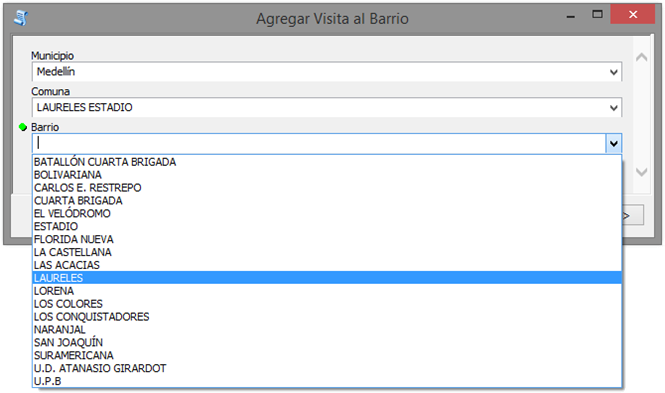
Let´s have a look at the ToolValidator class that I created:
import arcpy
import dct_camino_al_bario

# load dictionaries from external file
dct_com_muni = dct_camino_al_bario.dct_comuna_municipio
dct_cod_com = dct_camino_al_bario.dct_codigo_comuna
dct_cod_bar = dct_camino_al_bario.dct_codigo_barrio

class ToolValidator(object):
  """Class for validating a tool's parameter values and controlling
  the behavior of the tool's dialog."""


  def __init__(self):
    """Setup arcpy and the list of tool parameters."""
    self.params = arcpy.GetParameterInfo()

  def initializeParameters(self):
    """Refine the properties of a tool's parameters.  This method is
    called when the tool is opened."""
    init_check = False

    # municipios
    self.params[0].enabled = True
    muni_filter = self.params[0].filter
    muni_filter.list = sorted(list(set([muni for comu, muni in dct_com_muni.items()])))
    municipio = muni_filter.list[0]
    self.params[0].value = municipio

    # comunas
    self.params[1].enabled = True
    comu_filter = self.params[1].filter
    comu_filter.list = sorted(list(set([comu for comu, muni in dct_com_muni.items() if muni == municipio])))
    comuna = comu_filter.list[0]
    self.params[1].value = comuna

    # barrios
    lst_codigos = sorted(list(set([cod for cod, comu in dct_cod_com.items() if comu == comuna])))
    self.params[2].enabled = True
    barr_filter = self.params[2].filter
    barr_filter.list = sorted(list(set([barr for cod, barr in dct_cod_bar.items() if cod in lst_codigos])))
    barrio = barr_filter.list[0]
    self.params[2].value = barrio
    return


  def updateParameters(self):
    """Modify the values and properties of parameters before internal
    validation is performed.  This method is called whenever a parameter
    has been changed."""

    municipio = self.params[0].value
    comuna = self.params[1].value
    barrio = self.params[2].value

    if all([municipio != None, municipio != '']):
        # municipio is set
        lst_comuna = sorted(list(set([comu for comu, muni in dct_com_muni.items() if muni == municipio])))
        if all([comuna != None, comuna != '']):
            # comuna is set, check if value is valid
            if comuna in lst_comuna:
                # ok, don't change comuna, check barrio
                lst_codigos = sorted(list(set([cod for cod, comu in dct_cod_com.items() if comu == comuna])))
                # was: sorted(list(set([barr for barr, comu in dct_bar_com.items() if comu == comuna])))
                lst_barrio = sorted(list(set([barr for cod, barr in dct_cod_bar.items() if cod in lst_codigos])))
                if all([barrio != None, barrio != '']):
                    if barrio in lst_barrio:
                        # leave barrio unchanged
                        pass
                    else:
                        # barrio not in list
 self.params[2].filter.list = lst_barrio
                        self.params[2].value = ''
                else:
                    # barrio is not set
                    self.params[2].filter.list = lst_barrio
            else:
                # comuna is not valid, default
                self.params[1].filter.list = lst_comuna
                self.params[1].value = ''
 # barrio reset to none
                self.params[2].filter.list = []
                self.params[2].value = ''
        else:
            # comuna not set, reset list comuna
            self.params[1].filter.list = lst_comuna
            # barrio reset to none
            self.params[2].filter.list = []
            self.params[2].value = ''
    else:
        # municipio not set, blank comuna and barrio
        self.params[1].value = ''
        self.params[2].value = ''
     return

  def updateMessages(self):
    """Modify the messages created by internal validation for each tool
    parameter. This method is called after internal validation."""
    return
On lines 2 – 7, you may have noticed that I am loading some static dictionaries containing the data for the drop down lists. You can obviously use a different data source (like tables and/or featureclasses), but since the data is pretty static I decided to create some dictionaries with the relations between municipalities and communes, and communes and districts. Since the district names and not unique (may repeat themselves between municipalities) I have an additional dictionary that translates district codes to district names.
Below a snippet of the file dct_camino_al_bario.py:
# -*- coding: utf-8 -*-

dct_codigo_barrio = {
u'1700501001101010101':u'SANTO DOMINGO SAVIO NO.1',
u'1700501001101010102':u'SANTO DOMINGO SAVIO NO.2',
u'1700501001101010103':u'POPULAR',
u'1700501001101010104':u'GRANIZAL',
u'1700501001101010105':u'MOSCÚ NO.2',
u'1700501001101010106':u'VILLA GUADALUPE',
u'1700501001101010107':u'SAN PABLO',
... etc
}

dct_codigo_comuna = {
u'1700501001101010101':u'POPULAR',
u'1700501001101010102':u'POPULAR',
u'1700501001101010103':u'POPULAR',
u'1700501001101010104':u'POPULAR',
u'1700501001101010105':u'POPULAR',
... etc
}


dct_comuna_municipio = {
u'ARANJUEZ':u'Medellín',
u'BELLO':u'Bello',
u'BELÉN':u'Medellín',
u'BUENOS AIRES':u'Medellín',
u'CALDAS':u'Caldas',
... etc
}Continuing with the ToolValidation:
On line 19 the initializeParameters function starts. This will be called when the tool is initialized and will fill the fields with initial values using some list comprehensions.
Line 27 creates a list of unique values for the municipalities, which is assigned to the list of the filter, and the first value of the list gets selected.
Line 34 creates the list of communes, for the selected municipality, and sets the first commune as selected item.
Line 42 create the list of districts for the selected commune and sets the first district as selected item.
When you change a value (even during the initializeParameters) the updateParameters function (see line 49) is called. In order to avoid that values will be rest some things need to be done.
Lines 54 – 56 read the current select values of the 3 parameters.
Line 58 will check is the municipality is set. If so, the list of communes will be filled based on the municipality. If not the commune and district is set to an empty string.
Line 61 checks if the commune is set. If so and the value is part of the list created based on the selected municipality, than a list of district codes is created and the names of the districts are retrieved based on these codes. If not, the commune is set to en empty string.
The code works and is pretty fast (not sure what the effect would be when using tables and featureclasses as source for this).
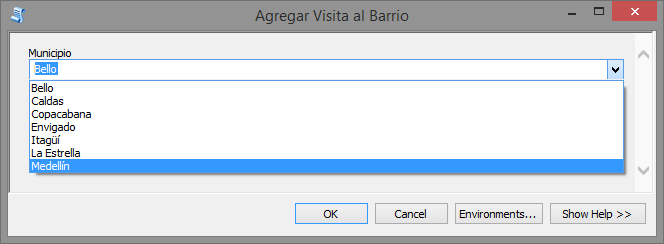
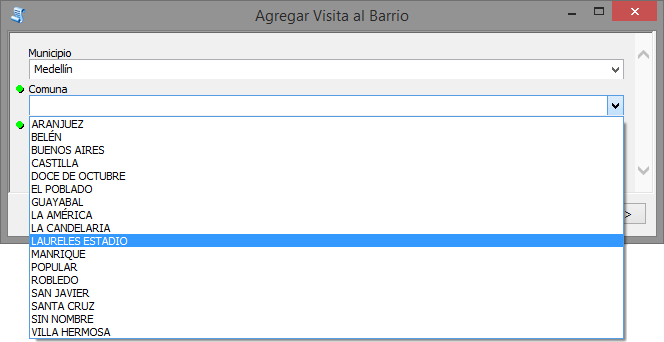
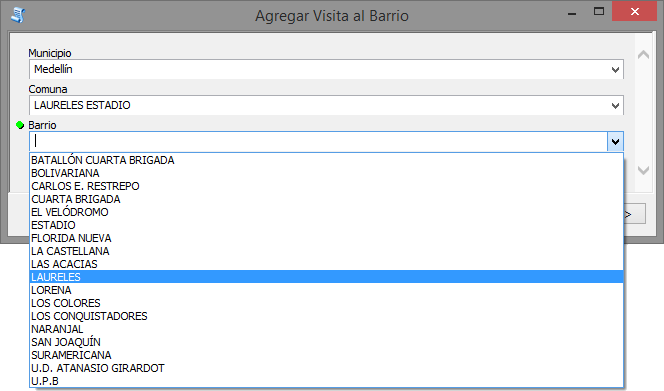
So, then I thought, let´s do something silly, and publish this as GP service and configure the GP widget in Web AppBuilder to see if this works in the browser… Before you get excited, this does NOT work!
Have a look at the help page: Authoring geoprocessing tasks with Python scripts—Documentation | ArcGIS for Server (scroll down to tool validation code). Tool validation code can be implemented in ArcGIS Server, but will be executed on the server and not client-side. This means that the drop down lists will be filled with the content of the successful run on Desktop used to publish the GP service. There will be no dependencies between them and they will not work the way they do on desktop. Once you run the tool, the tool validation will be executed server-side and yield an error if the selections do not match the defined criteria.
So, if you want to have cascading drop down boxes in a Widget of the Web AppBuilder, you will need to create a custom widget using JavaScript. See:
Python python snippets
