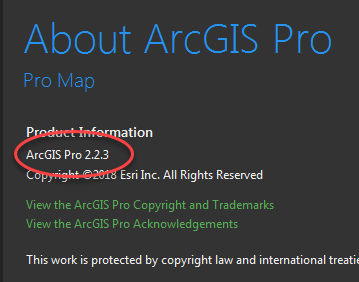
How do I get the version of ArcGIS Pro that is installed. We need to manage which version is installed on our users machines. Our configuration needs to be tested on all versions of pro that is released. So we need to get the exact version that a user has installed on their computer and alert them as to a change they might need to do.
<SPAN class="comment token">//This returns "2.2.0.0"???</SPAN>
<SPAN class="keyword token">string</SPAN> ArcGISProVersionLookup <SPAN class="operator token">=</SPAN> System<SPAN class="punctuation token">.</SPAN>Reflection<SPAN class="punctuation token">.</SPAN>Assembly<SPAN class="punctuation token">.</SPAN><SPAN class="token function">GetEntryAssembly</SPAN><SPAN class="punctuation token">(</SPAN><SPAN class="punctuation token">)</SPAN><SPAN class="punctuation token">.</SPAN><SPAN class="token function">GetName</SPAN><SPAN class="punctuation token">(</SPAN><SPAN class="punctuation token">)</SPAN><SPAN class="punctuation token">.</SPAN>Version<SPAN class="punctuation token">.</SPAN><SPAN class="token function">ToString</SPAN><SPAN class="punctuation token">(</SPAN><SPAN class="punctuation token">)</SPAN><SPAN class="punctuation token">;</SPAN><SPAN class="line-numbers-rows"><SPAN></SPAN><SPAN></SPAN></SPAN>
This code only seems to return 2.2.0.0, but I want 2.2.3 like below on the About page