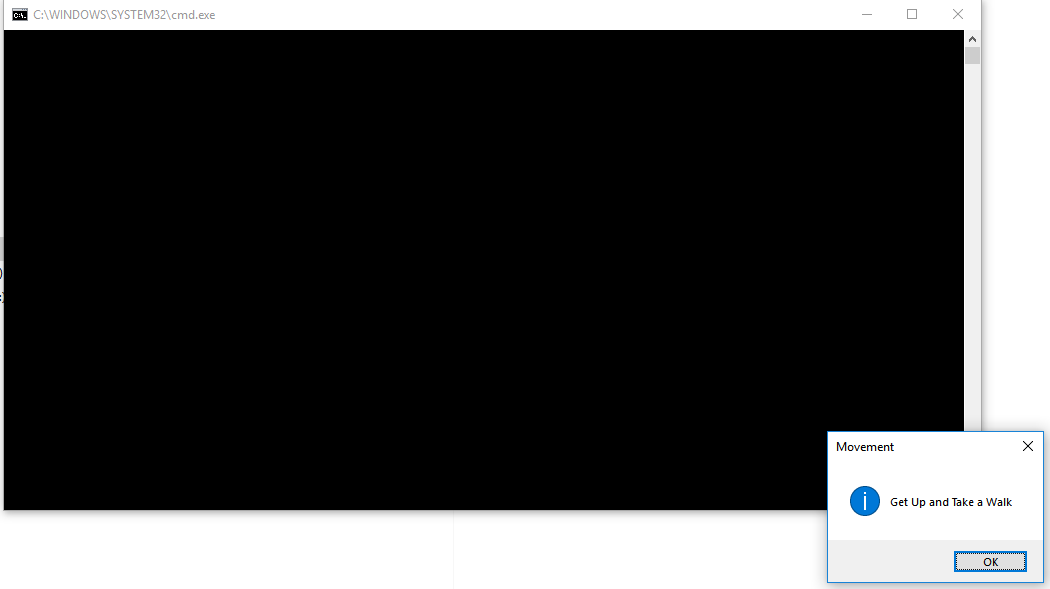
The windows 10 task scheduler has deprecated the use of pop ups. I have written a couple of tkinter message windows that I'd like to schedule to appear on my desktop. They work fine, but when I run them as a scheduled task, the python window appears as well as the tkinter message. I'd like just to see the message and no python window.
How to Execute Python Script using Windows Scheduler - Data to Fish provides a step by step how-to wrap a python script in a .bat file; doesn't seem to work for me, and I wonder if it's a windows 10 thing?
Bottom line; does anyone know how to execute a python script as a scheduled task to open a message on the desktop without a python command window as well?
My .bat file:
@echo off
<SPAN class="string token">"C:\Users\JBorgione\AppData\Local\ESRI\conda\envs\arcgispro-py3-clone\python.exe"</SPAN> <SPAN class="string token">"J:\PythonDevelopment\PopUps\GetUpReminder3.x.py"</SPAN><SPAN class="line-numbers-rows"><SPAN></SPAN><SPAN></SPAN><SPAN></SPAN></SPAN>
The actual tkinter message script:
<SPAN class="keyword token">import</SPAN> tkinter
<SPAN class="keyword token">from</SPAN> tkinter <SPAN class="keyword token">import</SPAN> messagebox
<SPAN class="comment token"># hide main window</SPAN>
root <SPAN class="operator token">=</SPAN> tkinter<SPAN class="punctuation token">.</SPAN>Tk<SPAN class="punctuation token">(</SPAN><SPAN class="punctuation token">)</SPAN>
root<SPAN class="punctuation token">.</SPAN>withdraw<SPAN class="punctuation token">(</SPAN><SPAN class="punctuation token">)</SPAN>
<SPAN class="comment token"># message box display</SPAN>
messagebox<SPAN class="punctuation token">.</SPAN>showinfo<SPAN class="punctuation token">(</SPAN><SPAN class="string token">"Movement"</SPAN><SPAN class="punctuation token">,</SPAN> <SPAN class="string token">"Get Up and Take a Walk"</SPAN><SPAN class="punctuation token">)</SPAN><SPAN class="line-numbers-rows"><SPAN></SPAN><SPAN></SPAN><SPAN></SPAN><SPAN></SPAN><SPAN></SPAN><SPAN></SPAN><SPAN></SPAN><SPAN></SPAN><SPAN></SPAN></SPAN>
the results:
I've tried to run it with windows 2.7python and both 2.7 and 3.x pythonw.exe to no avail....


