The inability to edit annotation in Pro < 2.0 was one of the biggest limitations that kept me from using Pro in many workflows. So I had been looking forward to the release of 2.0 even since I read that it'd include annotation editing. I've taken the full 2.0 Pro release for a test drive and was able to convert some street labels to annotation. Excellent start. Then I wanted to create some annotation for the streets that were missing a label. I opened the 'create features' panel and noticed that there was only one option for creating an annotation feature: horizontal
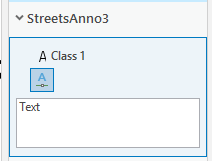
ArcMap gives you several options here: horizontal, straight, curved and (my favorite) follow feature. Are those options available in Pro? How do I enable them? I did find the help topic on changing an existing anno feature to a circular arc and Bezier curve. That new flexibility will probably come in handy at some point. But if I need to create a curved annotation feature, it seems that I'll first have create a horizontal annotation, then convert to circular or Bezier and adjust as needed. That's not a very efficient approach to adding a lot of curved annotation features. Is there a way to directly create a curved or follow feature annotation? How?
Thanks!


