Hi all,
I am attempting to edit one of our organization's hosted feature layers through the Rest API. We have a hosted layer that needs to be updated to better match a new version of one of our Survey123 forms - specifically with the addition of several coded domain values.
I was using this blog for guidance: https://www.esri.com/arcgis-blog/wp-content/uploads/2014/10/How-to-Update-Hosted-Feature-Service-Schemas1.pdf?rmedium=bulk-arcgis-files&rsource=http://blogs.esri.com/esri/arcgis/files/2014/10/How-to-Update-Hosted-Feature-Service-Schemas1.pdf
However, within Update Definition, the input (where the editable JSON should appear) is totally blank.
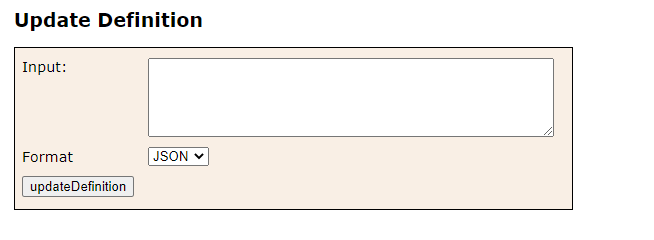
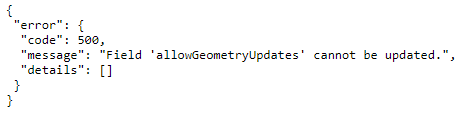
I also tried copying the JSON at the front of the rest URL, edited it, verified the JSON, but when I tried to paste it into the Input here with my changes and click 'updateDefinition' I received this error:
For my last attempt I used AGO-Assistant to view the layer's JSON and attempted to replace it with the updated JSON. But the changes did not register. The JSON presented in AGO was also shorter and missing much of the information from the JSON at the rest URL.
Our organization is currently using ArcGIS Portal and ArcGIS Enterprise, not AGOL, so I'm not sure if that could be a factor. At this point the simplest solution for me would be to make a local copy of the feature layer and overwrite it, but its being used in so many webmaps and customizations so that is really a last resort option for me.
Any thoughts as to why this could be happening? Workarounds?

