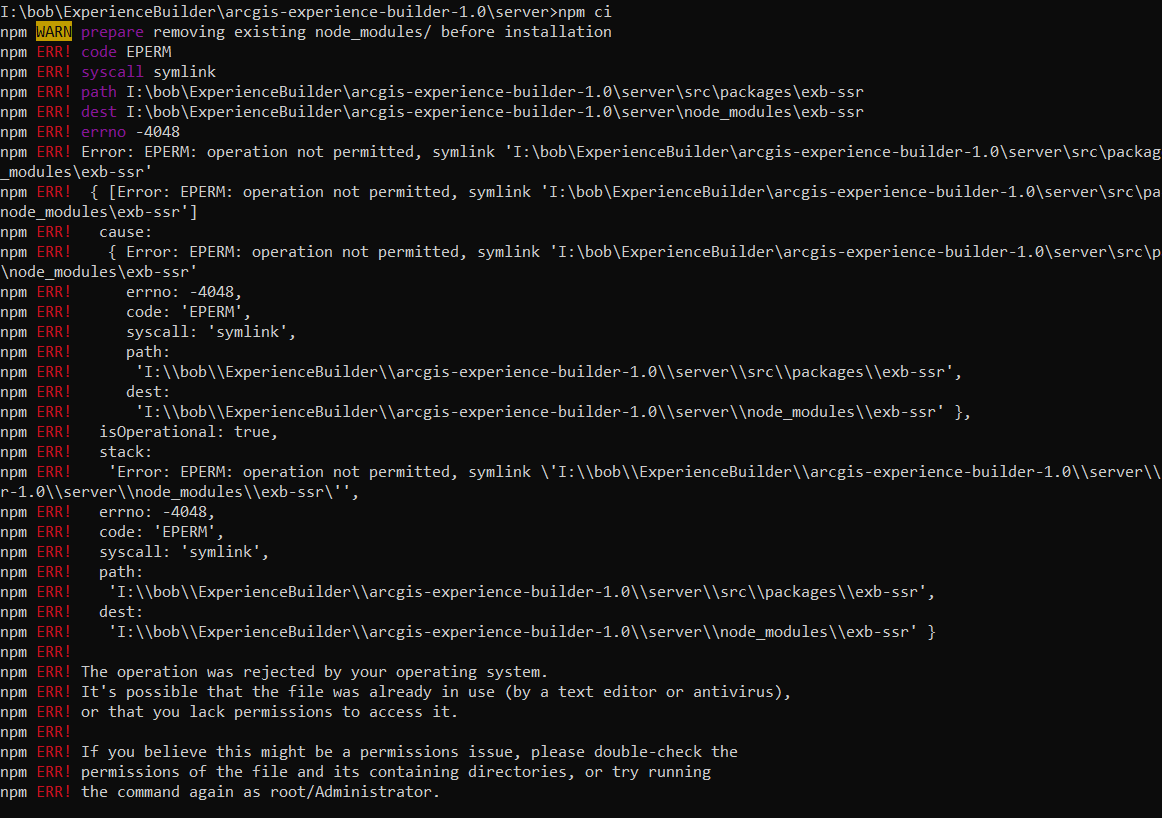
In the process of trying to install the new Experience Builder Developer edition v1.0, I have run into a snag. I followed these instructions: ArcGIS Experience Builder install | ArcGIS Experience Builder up to step 8 for the Server install section. When putting in the command npm ci to install the modules, an error is thrown:
I am running windows 10 and have Node.js 10.19 64 bit installed. Any ides? Thanks!
Try running the command from a command prompt with administrative privileges (in start right click Command Prompt and click "Run as Administrator")
James, thanks for your quick response! I tried your suggestion but unfortunately it didn't work...same error message. Any other suggestions?Sent from my T-Mobile 4G LTE Device
Hi Bob, what rights do you have to your machine? Can you install software etc.?
Thanks,
David
Yes...I have admin rights to load software.Sent from my T-Mobile 4G LTE Device
I figured it out.... I was trying to install on a network drive. I moved it to the c:\ drive and everything install with no problem.
This is good news.
Přihlášení členové mohou přispívat, sledovat aktualizace a další. Jste tu noví? Zaregistrujte si bezplatný účet.
Find useful guides, FAQs, and documents to help you navigate and make the most of Esri Community.


.png)