Hello,
I was trying to iterate through folder with rasters for some calculations between the bands of each one.
I have a script that is stored in a toolbox and ask for couple of parameters. when I run the script, it makes the process for the first image but after that it does not works for the next one and the following error appears:
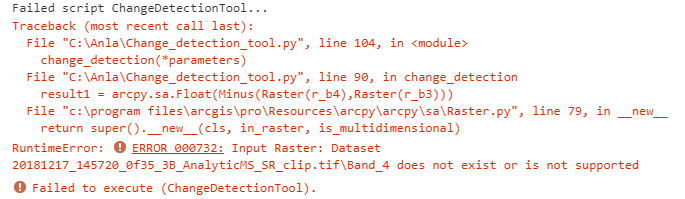
I should mention that I tried the same but running the script as stand-alone using the python command promt and it works
Then I tried something easy in the python window in ArcgisPRO:
import arcpy
from arcpy.sa import *
from arcpy import env
import os
arcpy.env.workspace = 'C:\\Imagenes_Satelitales\\2018\\Junio\\Poligono3'
arcpy.env.overwriteOutput = True
LR = arcpy.ListSpatialReferences('*SR_clip*')
LR
['20180607_145218_0f4e_3B_AnalyticMS_SR_clip.tif', '20180607_145219_0f4e_3B_AnalyticMS_SR_clip.tif', '20180607_145220_0f4e_3B_AnalyticMS_SR_clip.tif']
for raster in LR:
#getting bands
Image = Raster(raster)
b3 = Image.getRasterBands()[2]
b4 = Image.getRasterBands()[3]
result = arcpy.sa.Float(b4 - b3)
name = os.path.splitext(raster)[0]
result.save(os.path.join('C:\\Imagenes_Satelitales\\2018\\Junio\\Poligono3', name + 'result.tif')
Traceback (most recent call last):
File "<string>", line 3, in <module>
File "c:\program files\arcgis\pro\Resources\arcpy\arcpy\sa\Raster.py", line 79, in __new__
return super().__new__(cls, in_raster, is_multidimensional)
RuntimeError: ERROR 000732: Input Raster: Dataset 20180607_145218_0f4e_3B_AnalyticMS_SR_clip.tif does not exist or is not supported
That type of error is the same that I got when I run the complete script.
For now, I am going to continue using the python command promt for running the script but I would like to do it from the toolbox that I have for that purpose.
Thanks,
Jhon Eric




