Version: 2025.3.1.0.
Due to an update of Chrome (Edge) local network access is no longer allowed per default:
Adapting your website for new Local Network Access restrictions in Chrome
This change conflicts with our SharePoint configuration: SharePoint online + local Enterprise.
The error:
"The specified ArcGIS Online (or ArcGIS Enterprise) URL is not valid."
 The specified ArcGIS Online (or ArcGIS Enterprise) URL is not valid.
This is only an issue when the DNS server directs traffic to our Enterprise server directly to the local ip (thus; local network access). When using the external, public DNS server traffic to our Enterprise is directed to our external ip and the SharePoint maps work fine.
In order to fix this two things have to be set:
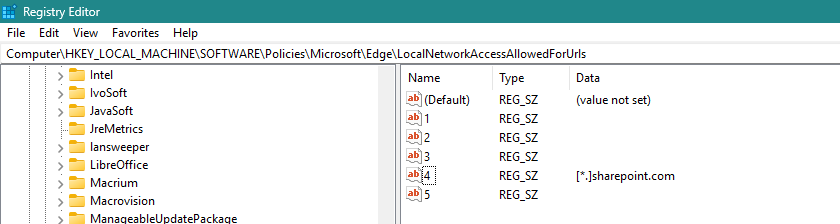
1.) The LNA policy in the Chrome (Edge) browser needs to be configured:
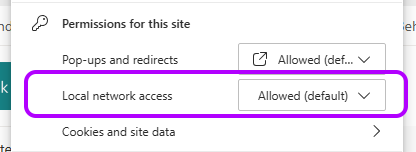
The site permissions then claim 'lna allowed' (without bothering the user):
Great, so far so good. However the 2nd step is beyond our control:
2.) The iframe tag needs to include 'local-network-access' in the allowed list.
This is the current config (2025.3.1.0):

<iframe frameborder="0" scrolling="no" id="esri-map-123" allow="clipboard-read;clipboard-write;geolocation" width="100%" height="600" src="https://la.arcgis.com/sharePoint/2025.3.1.0/reactapp/?webpartInstanceId=123&isVisitor=1&3d=0&locale=en-us&parentOrigin=abc"></iframe>
Using a local override you can include the lna tag and the site immediately displays our maps again:

<iframe frameborder="0" scrolling="no" id="esri-map-123" allow="local-network-access;clipboard-read;clipboard-write;geolocation" width="100%" height="600" src="https://la.arcgis.com/sharePoint/2025.3.1.0/reactapp/?webpartInstanceId=123&isVisitor=1&3d=0&locale=en-us&parentOrigin=abc"></iframe>
We have submitted a support call with our local reseller, but it is perhaps a bit difficult to reproduce this behaviour since the combination is quite specific.
We also tried adding our own iframe (with the lna tag) and embed the ArcGIS for SharePoint iframe within that. This had no effect; the tag is not inherited. Makes sense from a security standpoint, of course.
Question:
Is there a planned update to add allow="local-network-access" to the configuration in the ArcGIS for SharePoint app? Or is there another recommended solution for the interim?




