I try to Create AI Service Connection File (Data Management) and use into Classify Objects Using Deep Learning (Image Analyst) using the Vision Language Context-Based Classification Deep Learning Package.
When i try to create the OpenAI connection, the Use the model document says:
To connect directly to OpenAI, set the service_provider to "OpenAI" and provide your OpenAI API key using the api_keyfield. You must also specify the model to use by setting the deployment_name field (e.g., "gpt-4o" or "gpt-4"). The remaining parameters can be left blank when connecting directly to OpenAI, as they are only required when using OpenAI services hosted on Azure.
But, when i try to configure the deployment_name field, appears an error
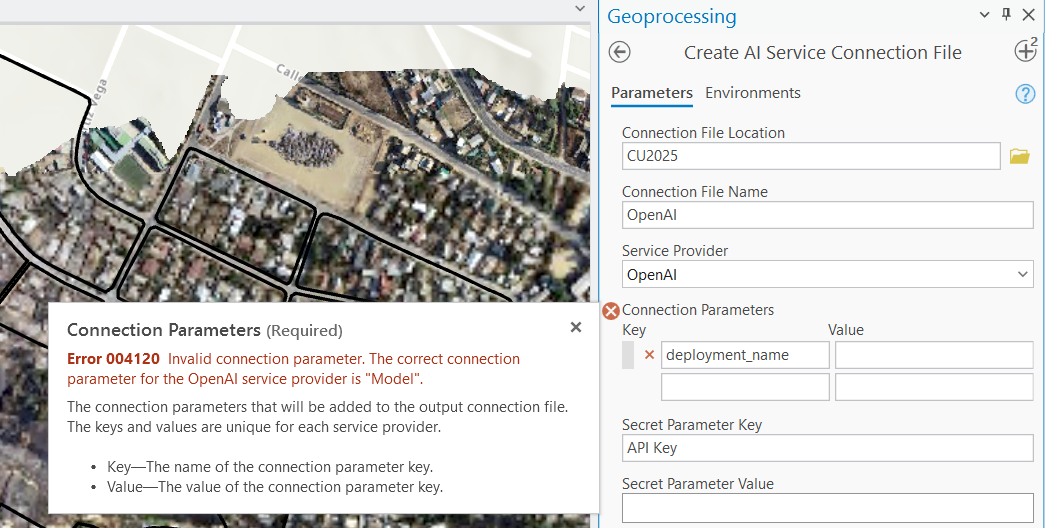
Error 004120: Invalid connection parameter. The correct connection parameter for the <value> service provider is <value>".
ArcGIS Pro 3.5
Description
An incorrect connection parameter was provided for a specific service provider.
Solution
Verify the correct connection parameter for the specified service provider and update it accordingly.
Wht'a the correct way to create an OpenAI Connection?
Thanks!



