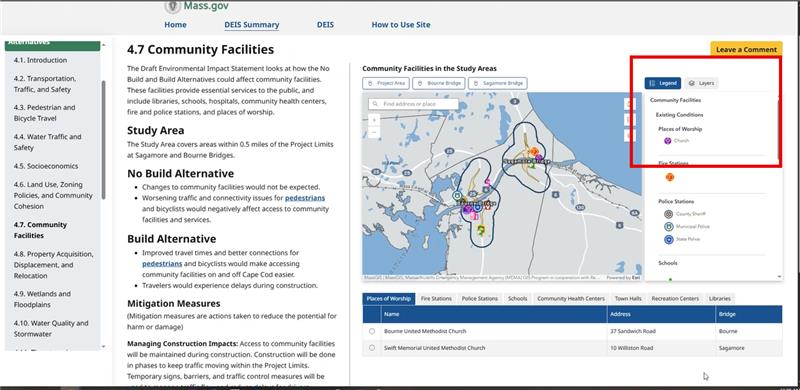
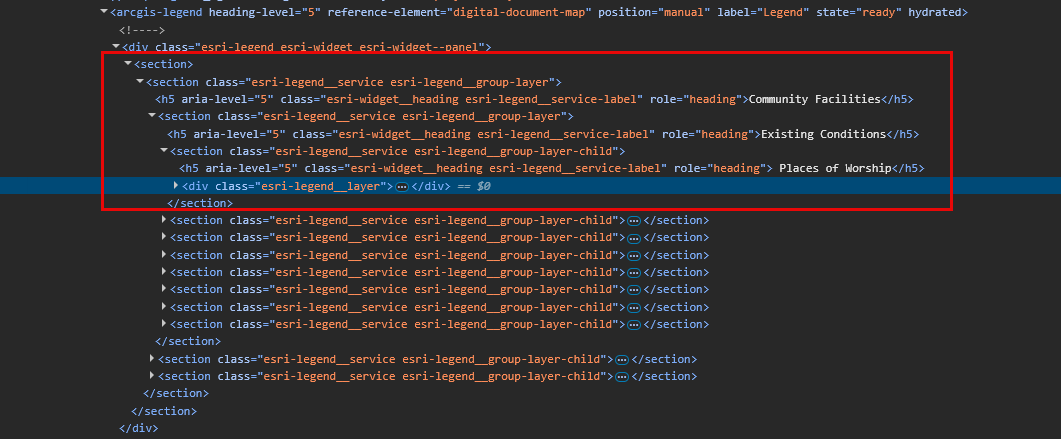
We are using the legend component from the ArcGIS SDK for JavaScript to display data organized in 3-level hierarchies (eg. Community Facilities → Existing Conditions → Places of Worship).
In order to provide WCAG 2.1 AA accessibility standards (Section 1.3.1) compliant products the current legend does not support a hierarchical heading structure that is accessible to screen readers.
At present, all legend elements—including the title, group layer names, and individual sublayer names—are rendered using the same heading level (<h5>).
This uniform structure limits accessibility, as screen readers rely on semantic heading levels to interpret and navigate content effectively.
While the SDK provides a heading Level property, it only allows setting a single heading level (e.g., <h3>), which is applied uniformly across all legend items.
There is no built-in functionality to assign different heading levels based on the layer hierarchy (e.g., <h1> for the legend title, <h2> for group layers, and <h3> for sublayers).
To meet accessibility standards, the legend should ideally follow a semantic structure such as: <h1> for the main legend title, <h2> for group or parent layers, and <h3> for individual sublayers
This structure would allow screen readers to interpret and navigate the legend content more meaningfully.
Without proper heading hierarchy, screen reader users cannot understand the relationship between map legend items or navigate efficiently through nested layers, making the map effectively unusable for blind/low-vision users. It's a legal compliance blocker for public-sector organizations and creates accessibility barriers that violate ADA requirements.