I've been playing around with the newly added Arcade functionality and I've run up against a frustrating issue. I have a text widget that is configured to work with selected features from a particular layer
// selectedFeatures1 is the selection view of data source.
 var selectedFeatures1 = $dataSources["dataSource_2-19962b4bcc1-layer-12-selection"].selectedFeatures;

var fproj = (first(selectedFeatures1))
console ("First Project: "+fproj)
var name = fproj.ProjectName
var sum = fproj.Summary
var ssum = concatenate(split(sum,"|"),`<br><br>`)
console(sum)
var time = fproj.Timeline
var back = fproj.Background
var sback = concatenate(split(back,"|"),`<br><br>`)
var contactName = fproj.CityStaff_Contact
//var contactPhone = fproj.CityStaff_Contact
//var contactEmail = fproj.CityStaff_Contact

/*(var returnString =
`<h3 style = "color:#000000;font-weight:bold; font-size:24px">${name}</h3>
 <p style = "color:#586424;font-wight:bold">Project Summary
  <p style="color:#000000">${sum}</p>
  </p>
`*/
var header = `<h3 style = "color:#000000;font-weight:bold; font-size:24px">${name}</h3><br>`
//var header = `${name}`

var sumString = IIF(!isEmpty(sum),`<h4 style = "color:#586424;font-weight:bold; font-size:18">Project Summary
  <p style="color:#000000; font-weight:normal;font-size:14px">${ssum}</p>
</h4>`,'')
// var sumString = IIF(!isEmpty(sum),`${sum}`,'')

var timeString = IIF(!isEmpty(time),`<h4 style = "color:#586424;font-weight:bold; font-size:18">Project Timeline: <span style = "color:#000000">${time}</span></h4><br>`,'')
//var timeString = IIF(!isEmpty(time),`Project Timeline: ${time}`,'')

var backString = IIF(!isEmpty(back),`<h4 style = "color:#586424;font-weight:bold; font-size:18">Project Background
  <p style="color:#000000; font-weight:normal;font-size:14px">${sback}</p>
</h4>`,'')

var contactString = IIF(!isEmpty(contactName),`<h4 style = "color:#586424;font-weight:bold; font-size:18">Project Contact<br>
  <span style="color:#000000; font-weight:normal;font-size:14px">${contactName}</span>
</h4>`,'')

var returnString = `
  ${header}${sumString}${timeString}${backString}${contactString}
 `


return {
  value: `${returnString}`,
  text: {
    // size: 14,
    // color: 'rgb(0, 0, 255)',
    // bold: true,
    // italic: false,
    // underline: false,
    // strike: false
  },
};
Here's the rub: if I don't actually have a feature selected while I'm working on this code, it fails to evaluate and will not insert.
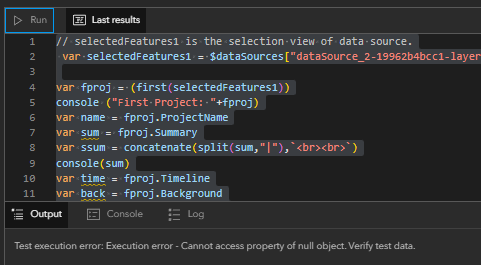
Now, if I go into Live mode and select a feature, then leave Live mode and enter the Arcade editor, it will successfully evaluate and insert. This is an issue because someone could very easily write great, correct code, and will be presented with a very unhelpful error and a widget that wont even accept all that they just wrote. It's not immediately clear that not having a feature selected is what throws this error either.
My proposed solutions are:
1 (preferred) just allow the code to insert if it fails to evaluate due to lack of selection. That's essentially what Arcade elements in the Map Viewer popup do if there's an issue with no features being grabbed anyway (which is to say, as long as the code itself is sound you can insert Arcade that just returns something empty).
2. (also good) better error messages that alerts the user to the lack of a selection, which causes the code to become un-insertable. Less desirable because it forces the user to leave the code window to go select something, but it would be better than nothing.


