Hello everyone!
I'm a little puzzled - there is probably an obvious solution - for the roads in this project I have it set to an order where I would expect the road with the dark lines to overlap the lighter-color roads.
For example - in this screenshot, I'm trying to get the "On-Campus" roads to overlap on top of the "Parking":
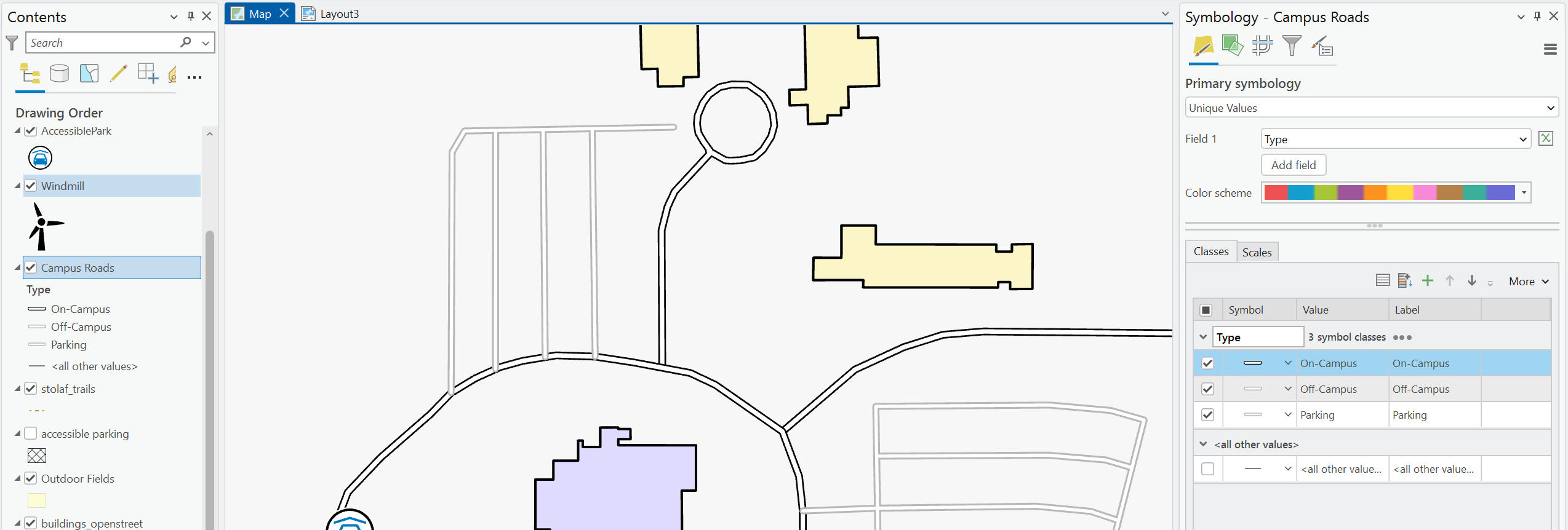
Is there a way to do this with the symbology hierarchy aside from having to just create a separate feature class? In the past, I thought all you had to do was make sure that it was a preferred order in the Symbology panel (see the screenshot of the symboloy panel above). I even tried reordering it to see if I could get a change, but nothing happens. It's possible I'm just missing a setting, but I haven't found anything yet even looking through the documentation.
Any advise is welcome!
(If you happen to know of any help documentation - I have already looked through the general ArcGIS Pro symbology documention, so please don't just send me a link to that. Let me know the section that you see the information in please!)




