When running listdatasources.bat on the Data Store server, I encounter the error:
Error encountered: 'spatiotemporal' data store is not configured on current machine.

This is strange since I don't have a spatiotemporal data store. We did at one point last year, but the previous employee removed it when before upgrading from 10.9 to 11.1.
So, somehow somewhere, there is still a lingering connection or property that is telling ArcGIS we have spatiotemporal data store (unconfigured though?). I tried using the REMOVE property from the setup.exe installation file, but it gives that same error about an unconfigured spatiotemporal data store.
Setup.exe /qb ACCEPTEULA=YES USER_NAME=mydomain/myaccount PASSWORD=Mypassw0rd
REMOVE=Spatiotemporal
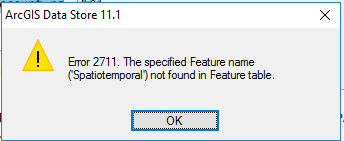
If I run describedatastore.bat, it doesn't list a spatiotemporal data store.
Available ArcGIS Data Stores
==================================================
Relational Data Store
Tile Cache Data Store
Spatiotemporal Big Data Store
Graph Store
Object Store
General information of ArcGIS data stores on <my server>
==================================================
Data store release..................11.1.0.42869
Staging location....................C:\arcgisdatastore\staging
Log location........................C:\arcgisdatastore\logs
Free disk space.....................48.00GB
Threshold for READONLY mode.........1024MB
Information for relational data store <my managed data store>
==================================================
Backup location.....................<my file server>
Is backup folder shared.............true
Backup schedule.....................{"schedule-starttime":"00:00:00","schedule-frequency":"Every 4 DAYS"}
Days backup retained................7
Data store status...................Started
SSL enabled.........................true
member machines.....................<my data store server>
Maximum connections.................150
Owning system URL...................<portal server>/arcgis
Portal for ArcGIS URL...............<portal server>/portal
Number of connections...............1 connection(s) to managed database
Data Store mode.....................READWRITE
Is Point-in-time recovery enabled...Yes
Query optimizer enabled.............Yes
Information for tile cache data store <another managed data store>
==================================================
Data location.......................C:\arcgisdatastore\nosqldata
Data store status...................Started
Backup location.....................<my file server>
Mode................................primaryStandby
member tile cache machines..........<my data store server>
Owning system URL...................<my arcgis server>:6443/arcgis/admin
Portal for ArcGIS URL...............<my portal server>portal
____________________________________________________________________________________
How can I troubleshoot this and remove the lingering connection?




