We are doing stereo aerial image interpretation in ImageAnalyst. Our stereo interpreter receives the following error message about every hour: A geodatabase exception has occurred. This happens in the following function, when executing featLayer.Search(queryFilter):
public static async Task<Feature> GetFeatureAsync(FeatureLayer featLayer, string whereClause)
{
	try
	{
		Feature feature = await QueuedTask.Run(() =>
		{
			// Query the FC
			QueryFilter queryFilter = new QueryFilter();
			queryFilter.WhereClause = whereClause;

            using RowCursor rowCursor = featLayer.Search(queryFilter);
			if (rowCursor.MoveNext())
			{
				// Get feature
				Row row = rowCursor.Current;
				feature = row as Feature;
				return feature;
			}
			return null;
		});
		return feature;
	}
	catch (Exception ex)
	{
		ProPopupMessage.Error(MiscUtils.GetMethodName(), ex.Message);
		return null;
	}
}I would like to explain a bit in more detail what the stereo interpreter is doing. He is recording woody plant coverage in every square of a biotope object:
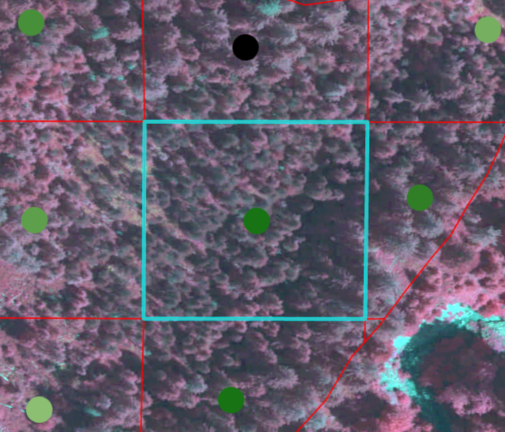
The workflow looks as follows:
- He selects a square on the stereo map
- In the code, the ObjectID of this square (polygon) is retrieved. The ObjectID corresponds to the ID of the point feature.
- The above function (GetFeatureAsync()) is called to get the corresponding point feature. The whereClause is "ID=" + objectID.
- After the error has occurred, ArcGIS Pro has to be restarted because the same errors occurs again and again when selecting a polygon.
I doublechecked, the objectID really exists when the error occurs. What could be the cause of the problem?
Should I try to search the feature class instead of the feature layer?



