I recently updated to 3.1.7 and started running into this error whenever I try to import packages that are dependent on numpy:
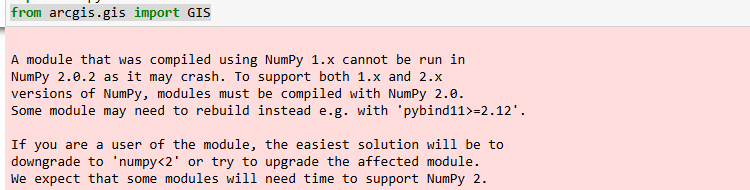
Since the error suggests something is going on with my numpy install, I started looking at some of the package installations in my ArcPro environment and it looks like my numpy installation is incompatible with my scipy installation:
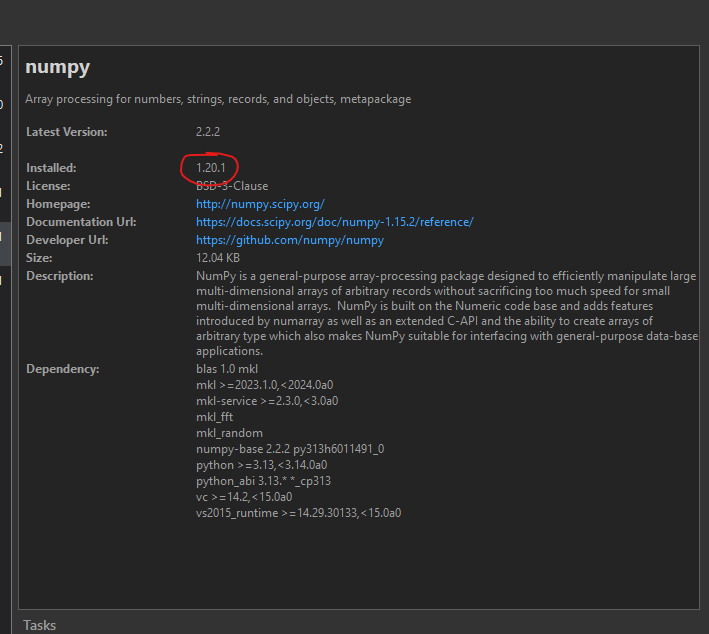
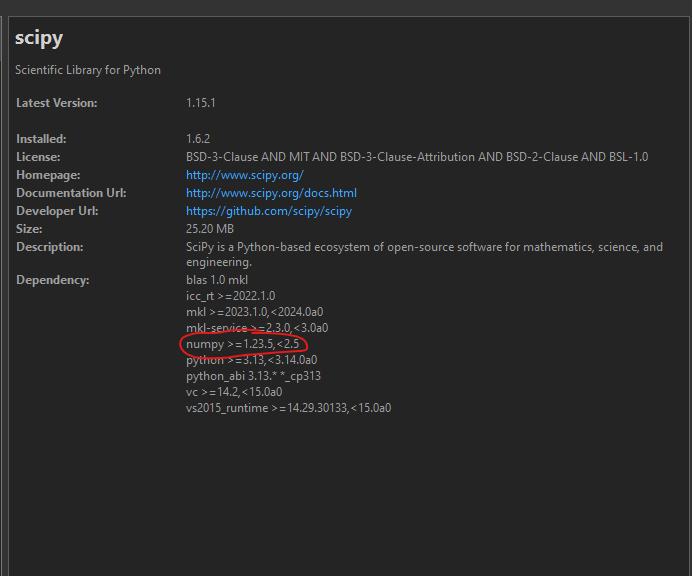
First off, I am confused because my numpy install appears to be below 2.0 but the error says that the module is being run on 2.0.2. I tried to upgrade my numpy package in a cloned environment via "conda install numpy=1.23.5", but the install fails because my requested specs conflict with pinned specs:
SpecsConfigurationConflictError: Requested specs conflict with configured specs.
requested specs:
- esri/win-64::arcpy-base==3.1=py39_41833
- esri/win-64::arcpy==3.1=py39_arcgispro_41833
- esri/win-64::cryptography==43.0.1=py39_0
- esri/win-64::numexpr==2.8.1=py39_0
- esri/win-64::scipy==1.6.2=py39_0
- numpy=1.23.5
pinned specs:
- mkl==2020.0=arcgispro_167
Use 'conda config --show-sources' to look for 'pinned_specs' and 'track_features'
configuration parameters. Pinned specs may also be defined in the file
\\AppData\Local\ESRI\conda\envs\arcgispro-py3-clone-1\conda-meta\pinned.
When I look at the codna-meta pinned specs it's got numpy 1.20.*
I also asked my co-worker about his environment and he has the same numpy and scipy versions but, scipy lists the numpy dependency as numpy>=1.19,<1.26.0.
Why does the same scipy version have different numpy dependencies? And how I can I resolve this dependency conflict if scipy lists a numpy dependency version that is incompatible with my pinned specs?

