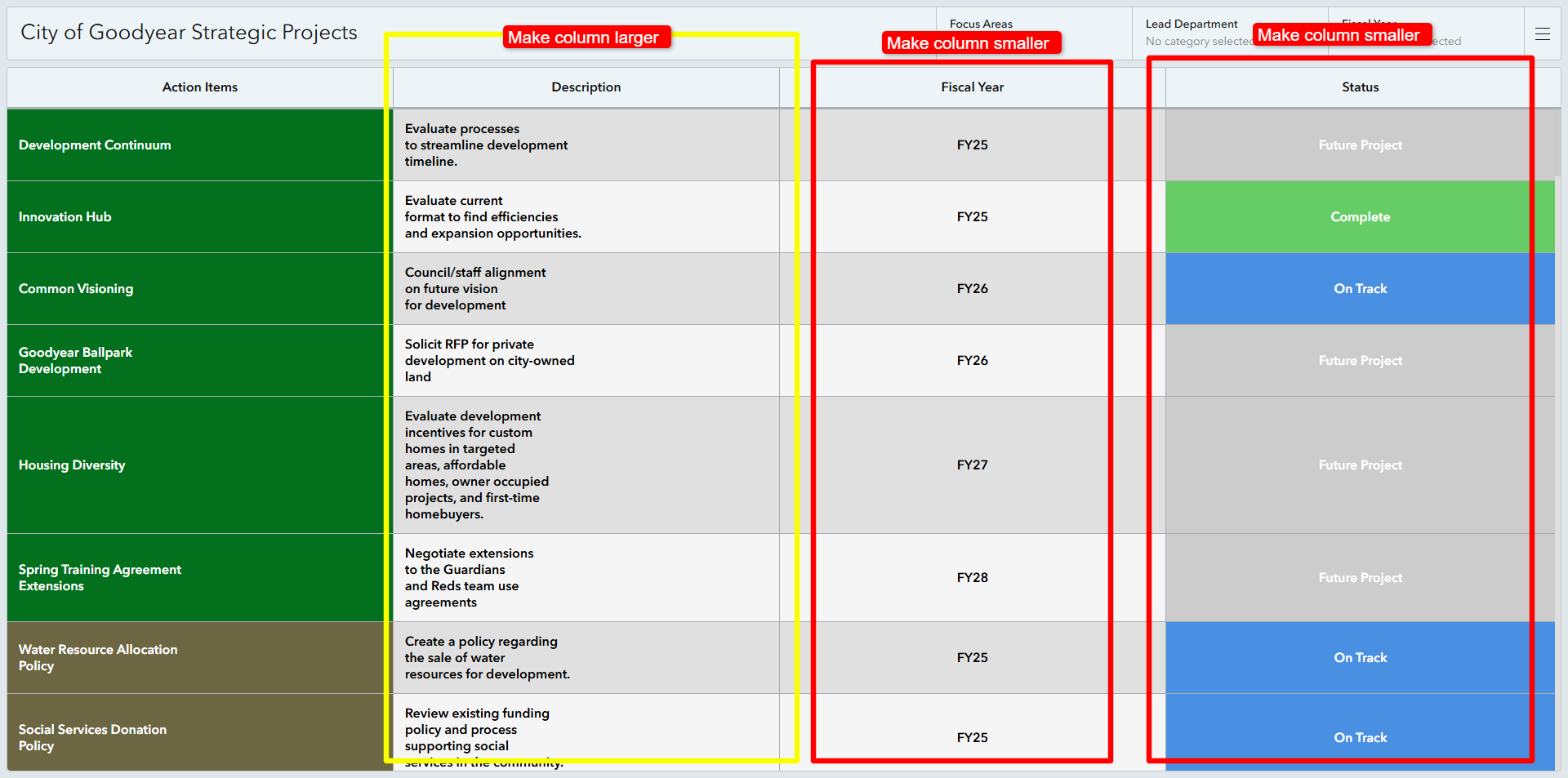
Currently, column widths in ArcGIS Dashboards table widgets are auto-sized based on the "Fit to element width" or "Fit columns" settings. While this works for basic layouts, it becomes a limitation when specific columns require custom widths. For example, a field like "Fiscal Year" with short text gets disproportionate space compared to a "Description" field containing much longer text.
I propose adding the ability to manually configure column widths directly within the "Column Settings" of table widgets. Users should be able to specify widths in pixels or percentages for each column (e.g., Fiscal Year = 100px, Status = 100px, Description = 300px). This would allow for greater control over the table layout, especially in cases where data visualization requires balanced column sizes.
Benefits:
- Improved table aesthetics and readability.
- Greater flexibility for data presentation.
- Addresses usability issues when auto-sizing does not allocate space logically.
This enhancement would save time on workarounds, such as shortening field content or adjusting widget settings to force better sizing.