Arcgis JS API Version - 4.26.
I have created a feature layer which show polygon feature. The polygons are drawn on the map alright but when I zoom in little some weird boxes starts to show in the middle of the polygons. Attached the screenshot.
Also, if I click on the empty area inside the polygon the hittest also do not return that feature in the result.
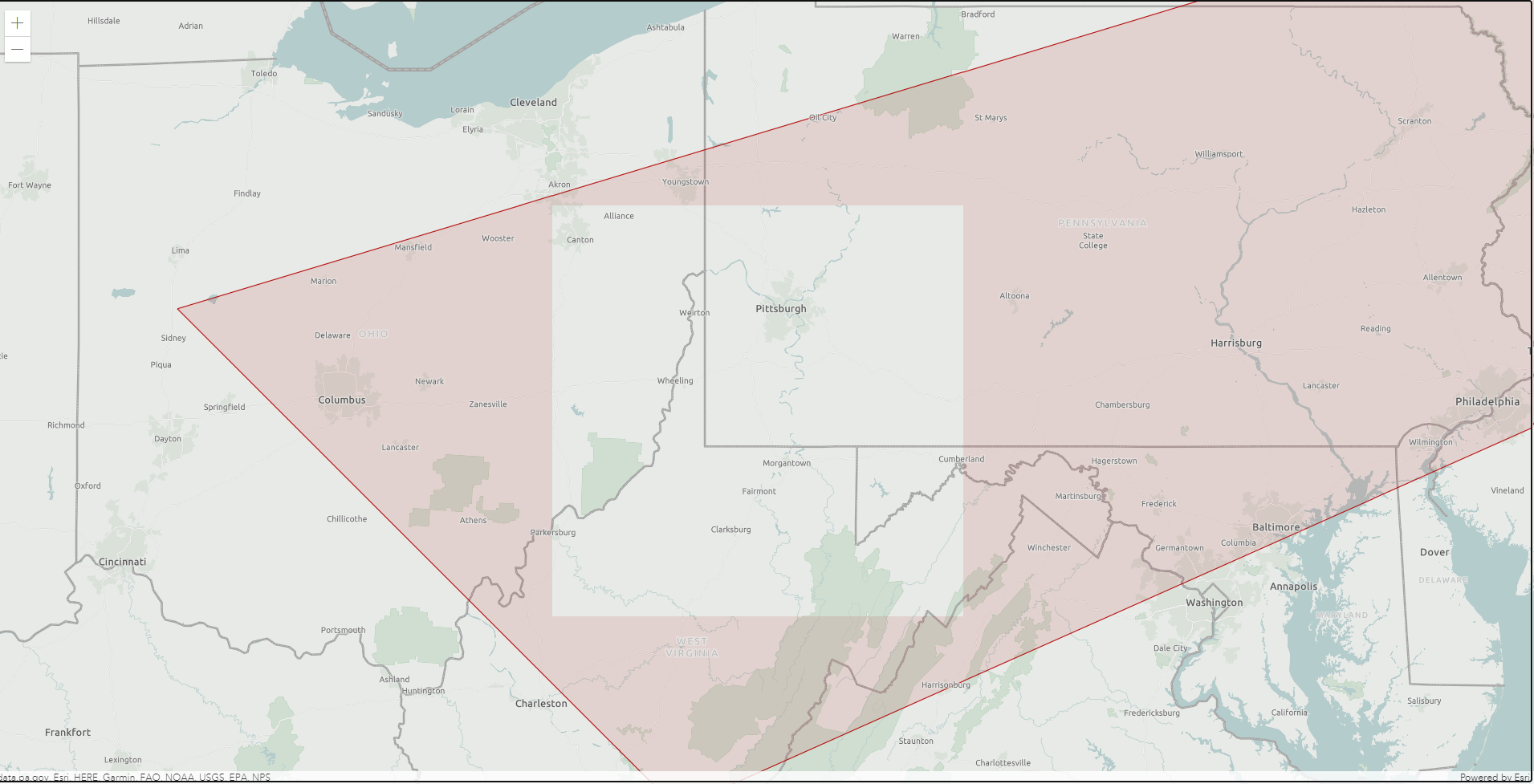
Is there any way to fix this? Added my code below.
<html>
<head>
<meta charset="utf-8" />
<meta name="viewport" content="initial-scale=1,maximum-scale=1,user-scalable=no" />
<style>
html,
body,
#viewDiv {
padding: 0;
margin: 0;
height: 100%;
width: 100%;
}
</style>
<script>
require(["esri/Map",
"esri/views/MapView",
"esri/Basemap",
"esri/layers/VectorTileLayer",
"esri/layers/FeatureLayer",
"esri/Graphic",
"esri/widgets/Legend"], (Map,
MapView,
Basemap,
VectorTileLayer,
FeatureLayer,
Graphic,
Legend) => {
const map = new Map({
basemap: new Basemap({
baseLayers: [
new VectorTileLayer({
portalItem: { id: "474f0cb226884dd68f707ab0f2f1aa10" }
})
],
referenceLayers: [
new VectorTileLayer({
portalItem: { id: "1768e8369a214dfab4e2167d5c5f2454" }
})
]
})
});
const view = new MapView({
center: [-80, 35],
container: "viewDiv",
map: map,
zoom: 3
});
// Create a symbol for drawing the point
const markerSymbol = {
type: "simple-marker", // autocasts as new SimpleMarkerSymbol()
color: [0, 0, 0],
outline: {
// autocasts as new SimpleLineSymbol()
color: [255, 255, 255],
width: 2
}
};
let data = [
{
"geometry": {
"type": "polyline",
"paths": [
[
-75.004,
42.506
],
[
-73.779,
41.14
],
[
-74.864,
39.817
],
[
-80.704,
37.787
],
[
-84.127,
40.442
],
[
-75.004,
42.506
]
]
},
"attributes": {
"id": "1234",
}
},
];
const testLayer = new FeatureLayer({
title: "Test layer",
visible: true,
fields: [
{ name: "objectId", type: "oid" }
],
objectIdField: "objectId",
geometryType: "polyline",
spatialReference: { wkid: 4326 },
source: data,
renderer: {
type: 'simple',
symbol: {
type: 'simple-fill',
color: [179, 5, 5, 0.1],
outline: {
width: 0.7,
color: "#B30505"
}
}
}
});
map.add(testLayer);
});
</script>
</head>
<body>
<div id="viewDiv"></div>
</body>
</html>

