Hi there,
I am an intern working on a project that entails updating data and procedures to produce an emergency services atlas for a county. The previous project was made using ArcMap and is being updated in ArcGIS Pro 3.1.1. I essentially have a PDF and copy of .mxd documents from the old atlas that need to be replicated with the updated data. The old data has annotation feature classes that I have updated to be current and upgraded them in order to be edited and used in ArcPro. However, my issue is that the annotations do not appear correctly or as they should.
1) I imported the old ArcMap document into ArcPro and repaired all broken data links with updated data
2) Found and added the old annotations to the Pro map document to be used. When in layout 1:1 (with identical page set up as the previous version), the annotation do not display as they appear in the PDF or ArcMap document.
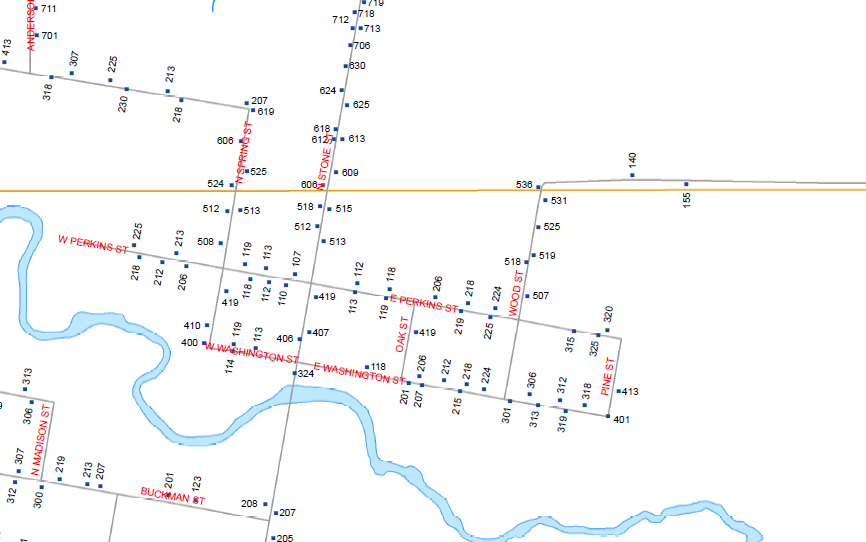
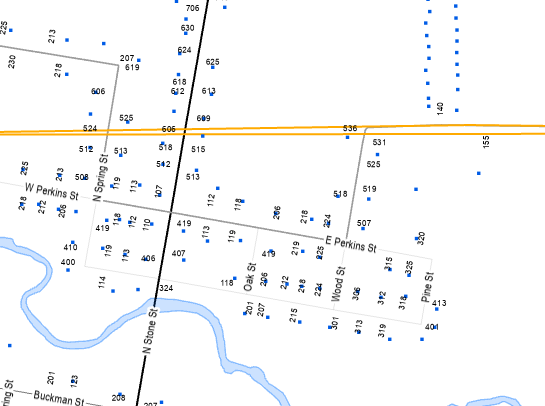
I checked scale extents and locks, the display field, and neither my boss nor I can not figure out why they appear off-position as well. I am hoping someone has had a similar experience and may be able to offer some guidance or suggestions. The first image attached is a zoomed in portion of what the annotation of structure points should look like (and how they appear in the official previous version). The second image is how they are appearing. Images are of identical areas. Hope this makes sense—thanks in advance!