Hi everyone,
I created a script that runs successfully in the ArcGIS Pro python window, but I would like to re-create this as a script tool to eventually be used for a geoprocessing service. I am having problems setting the output folder in the script tool. What is the correct data type to use when setting up the tool parameters? I've tried "Folder", "Workspace", and "String" with no success. (See below)
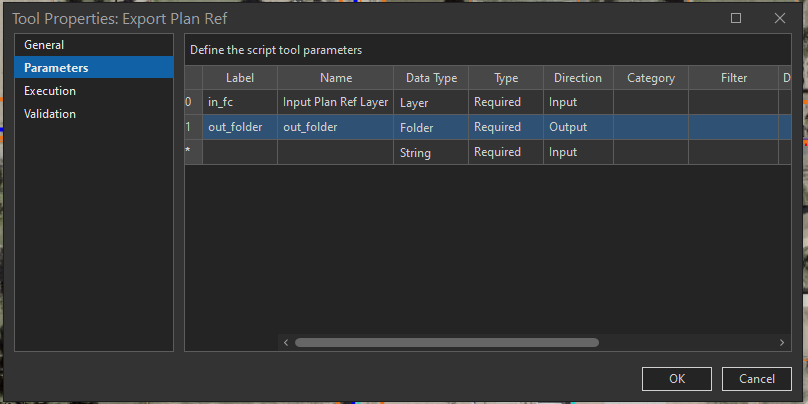
Basically the script copies files from a file directory based off a user selection and a hyperlink to the file using the "LINK" field. Any suggestions would be greatly appreciated!
Here is the original python window script that runs successfully:
import arcpy
import os
import shutil
aprx = arcpy.mp.ArcGISProject("CURRENT")
# Change to Name of Working Map
map = aprx.listMaps("Map")[0]
# Change to the location of the plan ref layer in your map
fc = map.listLayers()[0]
print(fc)
cursor = arcpy.SearchCursor(fc)
for row in cursor:
    field = "LINK"
    link = (row.getValue(field))
    head, tail = os.path.split(str(link))
    print ("Downloading: " + tail)
    # Set Download Location
    dest_path = r"H:\Data Requests\ExportFolder"
    shutil.copy(link, dest_path)

print("Download Complete")
Here is the script tool code:
import arcpy
import os
import shutil

fc = arcpy.GetParameterAsText(0)
print(fc)
cursor = arcpy.SearchCursor(fc)
for row in cursor:
    field = "LINK"
    link = (row.getValue(field))
    head, tail = os.path.split(str(link))
    print ("Downloading: " + tail)
    # Set Download Location
    dest_path = arcpy.GetParameterAsText(1)
    shutil.copy(link, dest_path)

print("Download Complete")

