When you symbolize a layer with two or more classes FIELDS the labels of the symbols get concatenated with a comma between them and no spaces as shown below.
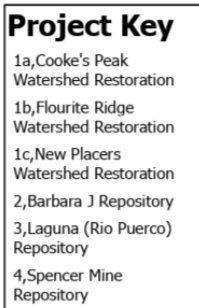
or... (ignore the periods and spaces here, that's me trying to work around the issue by editing attributes)
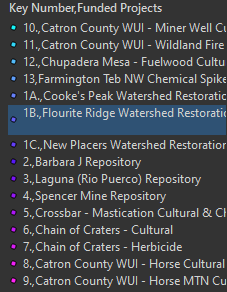
Currently, in order clean this up you must go in and manually edit each one to look like you want or write python scripts to do so as shown here.
https://support.esri.com/en/Technical-Article/000026861
I've run into this many times over the years, but this last time I thought I had it figured out. My python skills are just less than that of a child, but I don't think a user should have to learn python and spend days trying to get a script to work in order to have something simple like this done.
In the end, I added several fields to the dataset to have it turn out the way I wanted (this isn't always possible/allowed) and used a table frame, but we really should just have options on the formatting for these so we don't' have to manually edit them every time we make a change, and for automation purposes.
Suggested additions.
1. A period instead of a comma.
2. Spaces on both sides.
3. Greater Than/Less Than and Equals signs.
4. Possibly custom symbols or icons.


