I am following this guide to make a backup of my Enterprise 10.5: Migrate to a new machine in ArcGIS Enterprise using the WebGIS DR tool
At point 6 it reds
Create a backup with the WebGIS DR tool
Following the guide Create an ArcGIS Enterprise backup—Portal for ArcGIS (10.5.x) | ArcGIS Enterprise for 10.5, I read that I am supposed to have point-in-time enabled in my Data Store.
The ArcGIS Data Store relational data store in your ArcGIS Enterprise deployment must have point-in-time recovery enabled.
Reading ArcGIS Data Store command utility reference—Portal for ArcGIS (10.5.x) | ArcGIS Enterprise, it seems the right tool to to enable is found in cd C:\Program Files\ArcGIS\DataStore\tools.
The command I am trying to run from an Administrator command prompt is
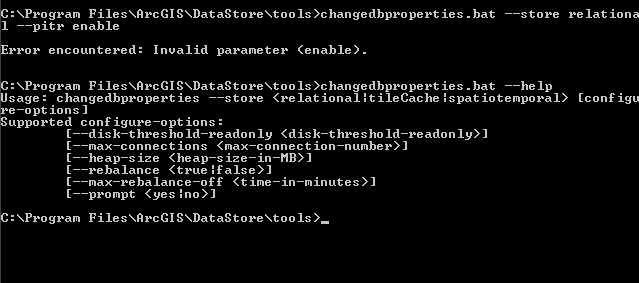
changedbproperties.bat --store relational --pitr enable
However, when I do it, I receive the error Error encountered: Invalid parameter <enable>.
Looking at the utility help by doing changedbproperties.bat --help, I don't see any pitr option, although the aforementioned documentation reads otherwise.
I am now stuck as it seems a prerequisites to run the WebGIS DR utility to make the backup.
Any suggestion?