Since there's no hope of getting a real definition query indicator in the TOC, it would at least be nice to be able to put the same dropdown found on the Data tab on the quick access toolbar.
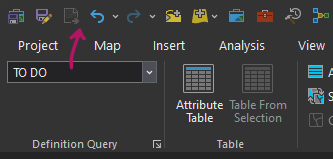
This would show the status of a selected layer and even which query is active without having to mess with a filter in the TOC, check the data tab, or check the properties box. Having this info at a glance is needed and it's nearly impossible in Pro despite the 35 upvotes on that idea at the time of closure and subsequent comments in support. There are actually no definition query options for the QAT other than one that simply links to that tab of the properties box.
It wouldn't be able to show the def query status of every layer at once, and it would take up a ton of horizontal space, yes, but this would beat having this setting buried on a ribbon tab that I don't use or inside the layer properties box. It would always be on my display and give me an indication that a query is active, at least when working with any given layer, which is really what I want. I could also switch queries quickly when my workflow requires it. The filter provided in the TOC to show layers with definition queries turned on is just not useful. You have to flip it on and off, and if you turn off a definition query for one of those layers listed, it doesn't even update. It still shows the layer as if it has a query on. Removing it from the list, though, would also have its annoyances if you're needing to flip the query on and off repeatedly. The filter may be a good answer to the question 'which layers in my project have definition queries turned on?' but that's not really the question that I find myself asking when it comes to definition queries. I moreso want to know when I go to work with a layer if that particular layer has a query; bonus points if I have easy access to which query and modifying the query. That filter does maybe one of those things, and not well. It requires you to manually turn the filter on (to see which layers have an active query) and then off (to get back to all your layers) and doesn't really help you identify or modify the active query any better than the normal view -- even the context menu is the exact same as in the regular drawing order view. An interactive indicator, whether in the TOC or QAT, would do away with this impractical and inefficient back-and-forth and give users something functional and intuitive.
My preferred solution again would be a little light/icon menu in the TOC, as described by that closed idea linked above, but simply having QAT access to the dropdown found on the data tab would be a step in the right direction.






