After creating a basicRasterLayer and setting the colorizer as shown in the code below.
How would the labels and label format be set?
The code used to colorize the raster copied from lines 147 to 171 in the ArcGIS Pro SDK Community Samples shown in this link.
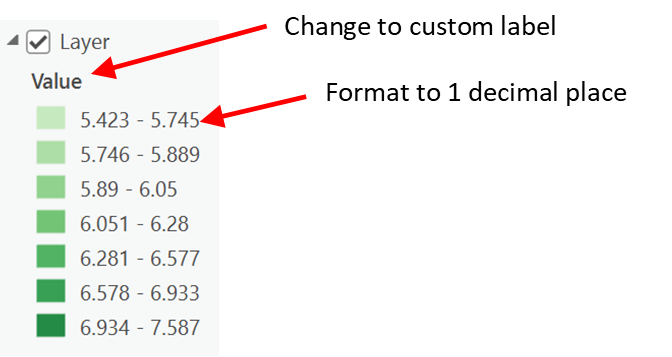
This code does not pertain to this problem other than the next step in this coding project is to change the "Value" field label to "Custom". Then change the formatting of the "Custom" field to show 1 decimal place.
These 2 operations need to be applied to the same basicRasterLayer that is called in the SetToClassifyColorColorizer () method shown below.
  public static async Task SetToClassifyColorizer(BasicRasterLayer basicRasterLayer)
    {
      // Defines values for parameters in colorizer definition.
      string fieldName = "Value";
      ClassificationMethod classificationMethod = ClassificationMethod.NaturalBreaks;
      int numberofClasses = 7;
      string colorRampStyle = "ArcGIS Colors";
      string colorRampName = "Aspect";

      await QueuedTask.Run(async () =>
      {
        // Gets a color ramp from a style.
        IList<ColorRampStyleItem> rampList = GetColorRampsFromStyleAsync(Project.Current, colorRampStyle, colorRampName);
        CIMColorRamp colorRamp = rampList[0].ColorRamp;

        // Creates a new Classify Colorizer Definition using defined parameters.
        ClassifyColorizerDefinition classifyColorizerDef = new ClassifyColorizerDefinition(fieldName, numberofClasses, classificationMethod, colorRamp);

        // Creates a new Classify colorizer using the colorizer definition created above.
        CIMRasterClassifyColorizer newColorizer = await basicRasterLayer.CreateColorizerAsync(classifyColorizerDef) as CIMRasterClassifyColorizer;

        // Sets the newly created colorizer on the layer.
        basicRasterLayer.SetColorizer(newColorizer);
      });
    }


