I'm trying to add expandable toolbars on both sides of my map. I've been able to get the toolbars to show up but I'm not able to use the calcite-action buttons to open their respective panel from the second toolbar.
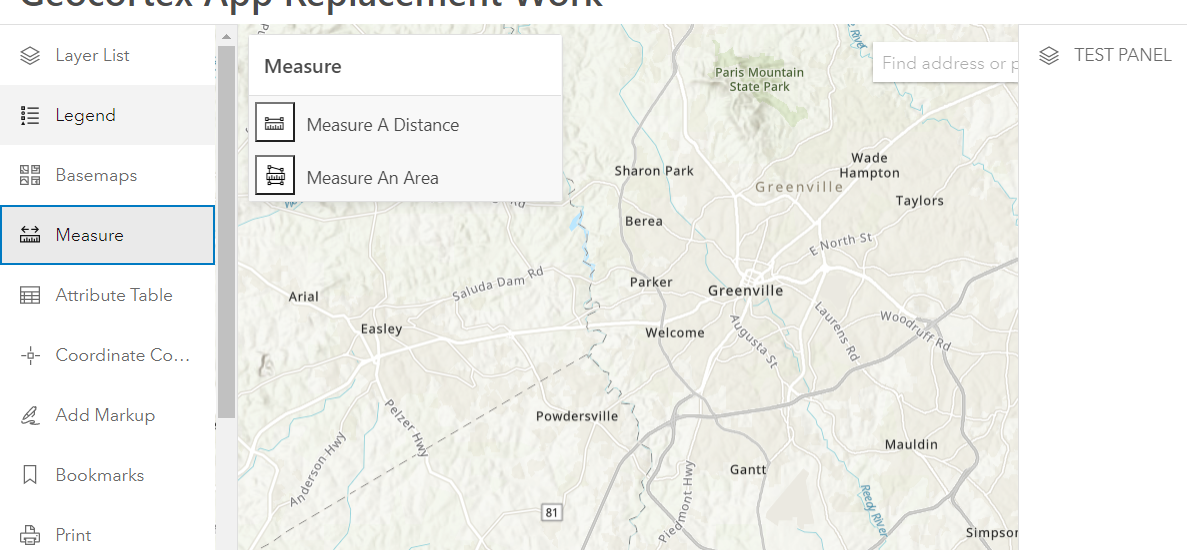
As shown below, both toolbars are present. When I click the calcite action on the left toolbar, the resulting panel displays just fine (Measure, in this example). However, when I click on the calcite action on the right toolbar the panel never displays (test panel, in this example). How can I get the panel to show for the toolbar on the right? I included my condensed code below.
<body>
    <calcite-loader active></calcite-loader>
    <calcite-shell content-behind hidden>
        <h2 id="header-title" slot="header"><img src="img/gwlogo.png" style="width:30px;height:30px;"></h2>
        <!-- FIRST PANEL, ON LEFT SIDE OF MAP -->
        <calcite-shell-panel slot="primary-panel" width-scale='' detached>
            <calcite-action-bar id="appToolbar" slot="action-bar" expanded>
                <calcite-action data-action-id="measure" icon="measure" text="Measure" title="Measure"></calcite-action>
            </calcite-action-bar>
            <!-- map-specific panels (each one provides a div for a ArcGIS JavaScript API widget) -->
            <calcite-panel id='measurePanel' heading="Measure" height-scale="l" data-panel-id="measure" hidden>
                <div id="measure-container">
                    <div id="distanceBlock">
                        <button id="distanceButton" type="button" title="Measure distance between two or more points"
                            class="action-button esri-icon-measure-line" style='display:inline;'></button>
                        <p style='display:inline;'>Measure A Distance</p>
                    </div>
                    <div id="areaBlock">
                        <button id="areaButton" type="button" title="Measure area"
                            class="action-button esri-icon-measure-area" style='display:inline;'></button>
                        <p style='display:inline;'>Measure An Area</p>
                    </div>
                    <div id="distanceBlock3d" class="noDisplay">
                        <button id="distanceButton3d" type="button" title="Measure distance between two or more points"
                            class="action-button esri-icon-measure-line" style='display:inline;'></button>
                        <p style='display:inline;'>Measure A Distance</p>
                    </div>
                    <div id="areaBlock3d" class="noDisplay">
                        <button id="areaButton3d" type="button" title="Measure area"
                            class="action-button esri-icon-measure-area" style='display:inline;'></button>
                        <p style='display:inline;'>Measure An Area</p>
                    </div>
                </div>
            </calcite-panel>

        </calcite-shell-panel>
        <!-- SECOND PANEL, ON RIGHT SIDE OF MAP -->
        <calcite-shell-panel slot="primary-panel" width-scale='' detached position="end">
            <calcite-action-bar id="appToolbar2" slot="action-bar" expanded>
                <calcite-action data-action-id="TEST" icon="layers" text="TEST PANEL" title="TEST PANEL">
                </calcite-action>
            </calcite-action-bar>
            <!-- map-specific panels (each one provides a div for a ArcGIS JavaScript API widget) -->
            <calcite-panel id='TESTPanel' heading="TEST" height-scale="l" data-panel-id="TEST" hidden>
                <div id="TEST-container"></div>
            </calcite-panel>

        </calcite-shell-panel>
        <div id="viewDiv"></div>
        <div id='overviewMapDiv' style="display:none">
            <!-- Overview Map Div -->
            <div id='extentIndicator'></div>
        </div>
    </calcite-shell>
    <div id="tableContainer" class="container hideElement">
        <!-- Attribute table div -->
        <div id="tableDiv"></div>
    </div>
    <!-- Load the jQuery library -->
    <script src="./node_modules/jquery/jquery-3.6.0.min.js"></script>
    <!-- Load the jQuery UI library for the data range calendar pickers -->
    <script src="./node_modules/jquery-ui/jquery-ui.min.js"></script>
    <!-- JQuery Query Builder JS File -->
    <script src="./node_modules/jquery-builder/query-builder.standalone.min.js"></script>
    <!-- Bootstrap JS File -->
    <script src="./node_modules/bootstrap/bootstrap.min.js"></script>
    <script src="https://js.arcgis.com/calcite-components/1.0.0-beta.77/calcite.esm.js" type="module"></script>
    <!-- Load the ESRI API library -->
    <script src="https://js.arcgis.com/4.23/"></script>
    <!-- Project JS Code -->
    <script src="js/config.min.js"></script>
</body>


