Hi All,
Here's what's happening
- In ArcGIS Pro, make a toolbox script and run it successfully.
- Publish as a web tool successfully
- BUT, when I run the web tool, I get the following error
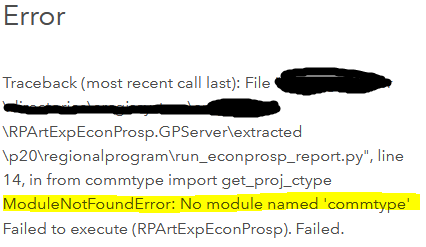
I look in the server machine where published tools are hosted and I see that not all of the scripts used by the tool are uploaded to the server. Comparing the two photos below, the photo with more stuff in it is my dev folder, while the one with less stuff is the folder on the server machine. As you can see, when I publish, not all the scripts make it on to the server.
 Scripts on dev/desktop
 Scripts that actually get published to server
As a workaround, if I manually copy over the scripts that didn't publish, then restart the web service, all works well, but this seems like an inconvenient workaround. Why aren't all scripts publishing? Do I need to tweak my code? Here is how I'm importing modules in the main script--highlighted lines are for modules that did not import*:
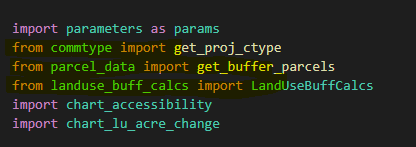
* I have an untested theory that if I specify from <module> import <thing> that it will result in the module not uploading. Is this the case? Do I instead need to write import <module> then in my code specify <module>.<thing>?


