While in an ArcGIS Pro project, I used the Catalog Pane to copy and paste an existing Map (curiously this takes longer than you would think). When I open the new Map, my layers from SQL Server (native, not "SDE") and a layer from a geopackage have the broken link red "!" by the layer name.
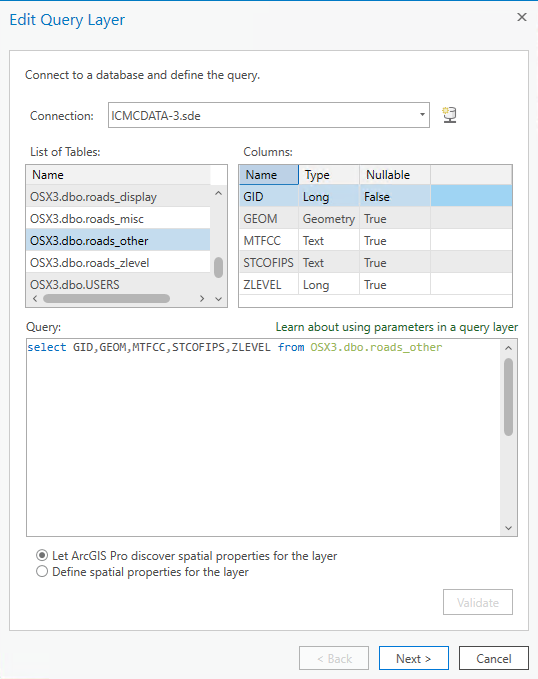
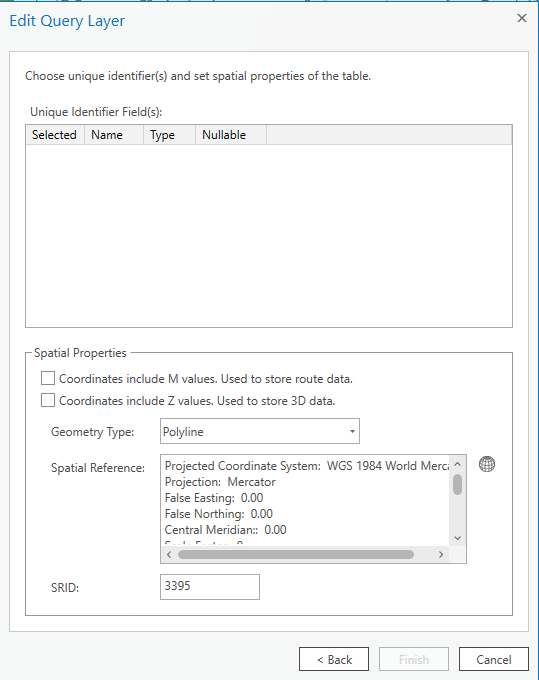
When I open the layer's properties and try to set the source, I get a message the query layer must be edited. When I attempt to edit the query, all of the original information is there, but when I am to select a unique ID, no fields are displayed in the selection area and I can not complete the editing.
If I switch maps to the map I just copied, all the layers are displaying fine.
This seems to be a bug in the copy/paste of a map. But why can I not set the ID when editing the layer?
I'm using ArcGIS Pro 2.9.1.
Edit Query is correct, unique ID field is "GID"
No fields are displaying in the selector, and I can not complete the edit.
Thanks!

