I am attempting to set up ArcGIS Enterprise on AWS, using ArcGIS Enterprise Cloud Builder. I am new to the installation/configuration process of ArcGIS Enterprise, although I've worked with ArcGIS Servers before and we do use other AWS services. I have acquired an SSL certificate for my anticipated domain, and I purchased that through Register.com / Network Solutions. After it was validated, I retrieved the certificate which resulted in two .crt files, one of which is for the domain.
However, the "Configure Elastic IP Address (EIP) step of ArcGIS Enterprise Cloud Builder for AWS requires a certificate in .pfx format.
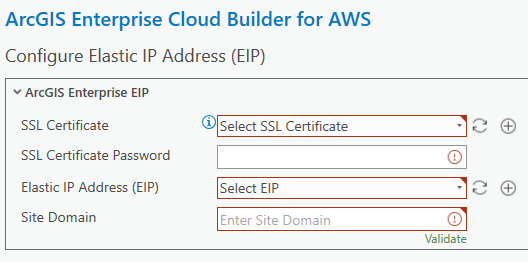
I have done some searching, and the only pfx file generators I can find require both the certificate AND a private key, which I do not have.
I do not know how to proceed beyond this step. I have an SSL certificate, but it is in .crt format and I can't figure out how to convert it to the required .pfx format. As you can probably tell, I have little experience with SSL certificates. All of the SSL certificates I've dealt with in the past are configured and managed in AWS Certificate Manager, but it does not seem like that is an option for these EC2 instances that ArcGIS Enterprise would be hosted on.
Any advice would be appreciated. I have been stuck on this step for quite a while now.
Thank You

