I have a multivalue parameter in my python tool and the values may include characters such as quotes. When I select such a value from the list (and the one after it) and click run I get an error below.
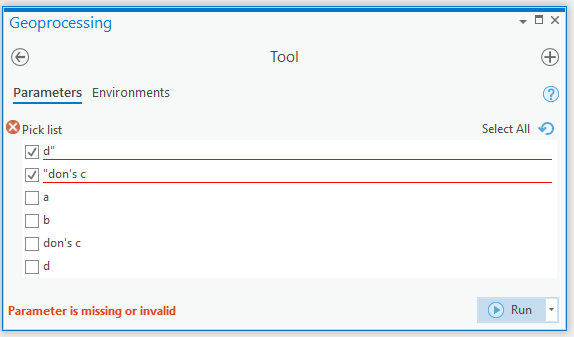
Since this all happens even before any of my toolbox functions are called (in any case they are empty) there must be some trick in specifying the list of value in the first place to get this to work. Here is my toolbox source that shows defining the parameter. These are the only modifications I made to the default tool code.
    def getParameterInfo(self):
        """Define parameter definitions"""

        p1 = arcpy.Parameter(
                displayName='Pick list',
                name='p1',
                datatype='GPString',
                parameterType='Optional',
                direction="Input",
                multiValue=True)
        p1.filter.type = "ValueList"
        p1.filter.list = ["a", "b", "don's c", "d"]

        params = [p1]
return paramsIn reality the list is populated from values looked up in a database so I don't have any control whether they contain quotes and it isn't an option to not include strings with quotes.
I'm running on the python that comes with ArcPro 2.6.1 - Windows.




