ArcGIS Pro 2.6
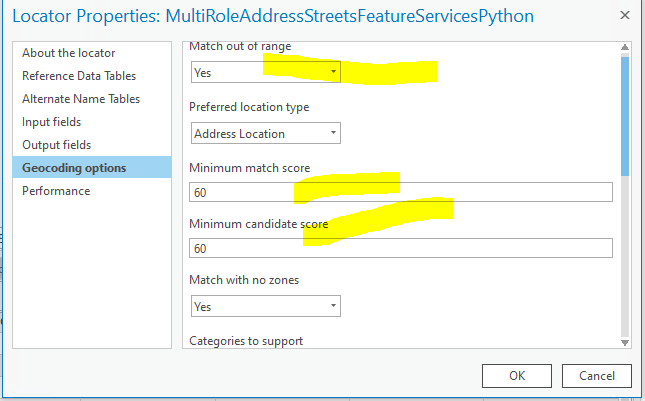
Can I change the default setting from yes to no when creating a street address role locator rather than changing it in the locator properties? For that matter, can I change any of the other properties like Scores etc in a python scripting environment rather than manually after the fact?
@ShanaBritt
@BradNiemand
Joe,
If you use updateLocator () after modifying the locator settings in Python, the properties get persisted into the locator for future use. If you don't call the updateLocator () method, the properties will only be applied for that session of geocoding in Python.
Doc all the way at the bottom of this page: https://pro.arcgis.com/en/pro-app/arcpy/geocoding/locator-class.htm#M2_GUID-B617A31C-2B5E-427F-BBEB-B52C1667CC51
Brad
Introduction to locator properties and options—ArcGIS Pro | Documentation
To modify the locator's settings, it must be either added to the project or accessed from a folder connection in the Catalog pane under the Folders category
If that makes any sense to you. I don't have one to check or test.
.
I thought there were some new python tools that would make it easier that were coming down the pike....
Locator—ArcGIS Pro | Documentation
Not a long read
Thanks Dan! I this might have been what I was thinking of ,
Unfortunately, it appears that the only way to change properties of a locator and have them permanent is to interact with the locators properties pane. If I were to geocode a table of addresses using python the Locator class and properties discussed would be the way to go:
import arcpy
''' set the property'''
locatorPath = r'M:\yady_yady\MSD_CenterlinesLocator.loc'
locator = arcpy.geocoding.Locator(locatorPath)
locator.matchOutOfRange = False

''' do the geocoding '''
addressesTable = r'M:\yady\yady\SomeTable'
addressLocator = r'M:\yady_yady\MSD_CenterlinesLocator.loc'
addressField = 'Address'
resultsFC = r'M\yady\yady\Some.gbd\GecodingResults'

arcpy.GeocodeAddresses_geocoding(addressTable, addressLocator, addressField, resultsFC, 'STATIC')
Thanks for pointing that out @BradNiemand !
Just for fun, here is an example of creating a single role street address locator using a feature service for the data source. After the locator is created, a couple properties get changed from the default:
import arcpy

arcpy.env.overwriteOutput = True
arcpy.SetLogHistory(False)

'''Create the locator'''
outLocator = r'M:\path\to\MyStreetLocator'
language = 'ENG'
country = 'USA'


inTable = "https://www.path/to/rest/services/myLocation/FeatureServer/9 StreetAddress"


fieldMapping =  "'StreetAddress.HOUSE_NUMBER_FROM_LEFT 9.FROMADDR_L';"\
                "'StreetAddress.HOUSE_NUMBER_TO_LEFT 9.TOADDR_L';"\
                "'StreetAddress.HOUSE_NUMBER_FROM_RIGHT 9.FROMADDR_R';"\
                "'StreetAddress.HOUSE_NUMBER_TO_RIGHT 9.TOADDR_R';"\
                "'StreetAddress.STREET_PREFIX_DIR 9.PREDIR';"\
                "'StreetAddress.STREET_NAME 9.NAME';"\
                "'StreetAddress.STREET_SUFFIX_TYPE 9.POSTTYPE';"\
                "'StreetAddress.STREET_SUFFIX_DIR 9.POSTDIR'"


arcpy.geocoding.CreateLocator(country, inTable, fieldMapping, outLocator, language)

'''With the Locator created set the default properties'''

locatorPath = f'{outLocator}.loc'
locator = arcpy.geocoding.Locator(locatorPath)

locator.matchOutOfRange = False
locator.minCandidateScore = 75
locator.minMatchScore = 75
locator.categories = 'Street Address,Intersection'
locator.updateLocator()
Latest documentation link: https://doc.esri.com/en/arcgis-pro/latest/arcpy/geocoding/locator-class.html#method-updateLocator
Přihlášení členové mohou přispívat, sledovat aktualizace a další. Jste tu noví? Zaregistrujte si bezplatný účet.
Find useful guides, FAQs, and documents to help you navigate and make the most of Esri Community.