Hello,
I'm upgrading an application from the 10.1.1 WPF Runtime to the 10.2.6 .NET Runtime and am having some issues with TextSymbol display.
I'm using TextSymbols on a GraphicsLayer to label dynamic graphics and am finding that the text looks jagged/not anti-aliased. If I switch the AngleAlignment to 'Map' it removes the jaggedness but the text becomes very blurry. Is there a method to enable anti-aliasing or turn on clear type like I could have done in the WPF Runtime?
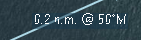
Below are a couple of examples of what I'm seeing:
Normal Text:
Italicized Text:
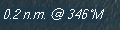
The first example generally only occurs when the geometry is moving and sometimes when the movement has stopped it will retain that very fragmented/unreadable look. The second italicized text is all of the time.
If anyone has any insight/tips on how to remedy this I'd be much obliged.
Thanks,
Aaron



