

- Mark as New
- Bookmark
- Subscribe
- Mute
- Subscribe to RSS Feed
- Permalink
I know this is from PRO, but it is the same in 'Map see the code block
assuming your field is called that, field.isNullable
http://pro.arcgis.com/en/pro-app/arcpy/classes/field.htm
Test the field...
| isNullable (Read and Write) | Indicates if the field can contain null values. |

- Mark as New
- Bookmark
- Subscribe
- Mute
- Subscribe to RSS Feed
- Permalink
Just one last question, I cannot Calculate Field containing the silly ~ sign, such as in ALASKA~C. How can I improve my code to deal with these ~ signs?
- Mark as New
- Bookmark
- Subscribe
- Mute
- Subscribe to RSS Feed
- Permalink
don't know...
also, in your accepted answer, also add a check to see if the field is numeric since it will have to return 0 rather than ''... hence the suggested 'isNullable' check, because if it isn't nullable, then it already has the shapefile equivalent for None (aka '' for text and 0 for numbers)
- Mark as New
- Bookmark
- Subscribe
- Mute
- Subscribe to RSS Feed
- Permalink
Thanks Dan. You're correct, I should check if the field is Numeric or Text in order to assign either 0 or ''. This would make the code more robust. Will investigate this soon...
Otherwise, Calculate Field with special character such as ~ did finally work with the code shown below (don't know waht happened yesterday!)
- Mark as New
- Bookmark
- Subscribe
- Mute
- Subscribe to RSS Feed
- Permalink
Found the solution!
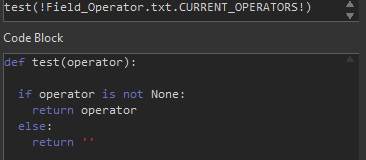
When there was a Null value in the joined table, the conditional statment could not "leave" a Null value in the shapefile. Instead, I inserted an else statment to return an empty value!
