AuGeo, latin for ‘augmented’, is an Esri Labs initiative to explore the possibilities of using ArcGIS data in an augmented reality environment. Available to ArcGIS users (Viewer User Type and above) for free in the iTunes and Google Play stores, the AuGeo mobile app allows you to easily bring data from your existing ArcGIS point feature layers into an augmented reality mobile app.
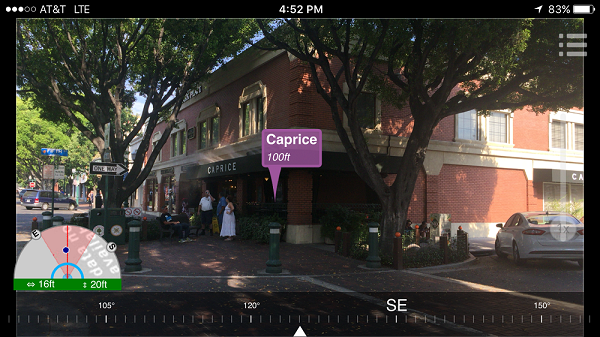
At Esri Labs we see many potential uses for Augmented Reality in GIS. While we love maps, locating assets around you can be easier through the lenses of a camera on your phone or tablet. Through an augmented reality view, we can more intuitively represent hidden assets (underground, covered by vegetation or snow), reducing the time needed for people to find what they were looking for.
Will augmented reality help perform asset inspections more quickly? Will it guide rescue teams towards a fire hydrant that otherwise would be missed? Will it provide the ultimate mobile user experience for the most technology averse real estate agent? Will it be the next cool way to explore tourist destinations in a city?
As a Research Project from Esri Labs, our intent with AuGeo is to make interesting technology available to you, so we can explore the possibilities together. To start with AuGeo, all you need is an ArcGIS Online subscription, some point data and a mobile device.
Preparing your existing data for use within AuGeo is very straight-forward as described in this tutorial.
We encourage you to experiment with AuGeo using your own data and scenarios. In our own experience, how accurately your GIS data is shown in AuGeo’s first person view is highly dependent on the quality of sensors in your device. The location accuracy and compass calibration in particular are key. Of course, the quality of your own GIS layers is critical as well. Only through use and experimentation you will learn what practical uses you can give to AuGeo.
We would love to hear your feedback through our Github Repository and evolve what already looks like a gold (Au) mine of possibilities.
The source code of this application is also available with AppStudio for ArcGIS. If you are a developer (no need for mad skills by the way), you can embed the AuGeo functionality into your own applications, or even brand AuGeo for your own purposes. We took the AuGeo AR view for example and embed it within another Esri Labs app called Trek2There.
Common questions:
- Do I need an ArcGIS account to access AuGeo? Yes. You need to sign-in with your ArcGIS credentials to start using AuGeo. Initially, you will only see a handful of sample layers we have published including coffee places and such, but you can add your own point layers.
- How can I add my own data into AuGeo? Follow steps as described in this video-tutorial.
- Why I cannot see any data when I select a layer too be added to the app? After selecting a layer you need to use the Refresh Data button to download data into your device. We use the current extent of the map to define the data to be downloaded.
- Does AuGeo work offline? Yes, once you have downloaded the data you can use it while disconnected.
- Can I display polylines and polygons? Not at the moment. AuGeo right now only supports points.
- Why is the location of my GIS features not correct in the First Person View? Your location or compass calibration may not be accurate.
- Will AuGeo drain my smartphone battery? It will! Just like when you keep your camera preview constantly open.
- Is AuGeo a supported product from Esri? AuGeo is supported through the public AuGeo Github repo. It is not an official Esri Product and as such it is not supported by Esri Technical Support.
- How was AuGeo built? AuGeo has been built on top of AppStudio for ArcGIS.
Esri Labs projects are released to public as non-commercial offerings but are NOT official Esri products. These projects do not have to go through the standard rigorous software development lifecycle and testing as other official Esri products. Esri Labs projects may not be holistically tested or documented, and are NOT supported by Esri Technical Support.