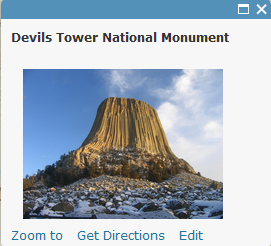
VERSUS
These are popups in my web map. I want to get rid of the line and extra space in the first popup. There is nothing different about how I made each popup - each has only the title and photo link. Why do they present differently? Image size? Image dimensions?
Suzanne,
Is there a way to share your web map link? The Devil's Tower popup looks like it doesn't have a title in the pop-up title area:
Hi Suzanne
Also if this is Story Map related can you include the URL to the app. If not Story Maps related then the more general ArcGIS Online space in Geonet may be a better bet (although we are lucky to have Adrian Welsh active in the Story Maps space
Rupert
It is a story map. We only have it saved within our organization, so is there a way to share it with you without going public?
Haha, thanks Rupert. I troll here and there...
You can make a group in ArcGIS Online and invite certain users to that group (and allow that group to have access to your map/app).
What is a group?—ArcGIS Online Help | ArcGIS
Can you let us know which of the eight Story Map apps you are using?
Rupert, Adrian, I have made a group and invited you both. I'm learning!
It does not appear to be the image format causing the line and extra space in half of the popups. Any other ideas?
Just a guess, but perhaps it's because two items are selected, notice the "(1 of 2)" in the heading.
Hi Adrian,
I thought you had something there, but if you look at Teton and Hot Springs, they have more than one popup, but don't have the line. Then Vedauwoo off by itself has the line and space. It's random it seems.
Thanks for you help though! I appreciate the extra set of eyes.
Suzanne
From: Adrian Welsh <geonet@esri.com>
To: Suzanne Luhr <suz_wyo@yahoo.com>
Sent: Monday, January 23, 2017 11:55 PM
Subject: Reply marked as helpful on why do my popups have same settings but different look?
#yiv0784852098 * #yiv0784852098 a #yiv0784852098 body {font-family:Helvetica, Arial, sans-serif;}#yiv0784852098 #yiv0784852098 h1, #yiv0784852098 h2, #yiv0784852098 h3, #yiv0784852098 h4, #yiv0784852098 h5, #yiv0784852098 h6, #yiv0784852098 p, #yiv0784852098 hr {}#yiv0784852098 .yiv0784852098button td {}
|
GeoNet
why do my popups have same settings but different look?
Adrian Welsh marked Jeff Segal's reply on why do my popups have same settings but different look? as helpful. View the full replyMarked as helpful:Just a guess, but perhaps it's because two items are selected, notice the "(1 of 2)" in the heading.
Following why do my popups have same settings but different look? in these streams: Inbox
This email was sent by GeoNet because you are a registered user.
You may unsubscribe instantly from GeoNet, or adjust email frequency in your email preferences |
Hi Suzanne,
Sorry for the extremely late reply. I am just now getting back to this. Were you able to find a resolution for this?
Thanks,
Adrian
Signed in members can post, follow updates, and more. New here? Register a free account.
Find useful guides, FAQs, and documents to help you navigate and make the most of Esri Community.