My problem statement for the Community is:
I have a Classic Map Series type Classic Story Map that I need to migrate before the Classic is retired. I intend to recreate the new version in Experience Builder (unless there is a better or easier suggestion?)
Here is a link to the Classic Map Series I am migrating: https://santarosa.maps.arcgis.com/apps/MapSeries/index.html?appid=4e3496891e2b4726a2b3235cd9f186c8
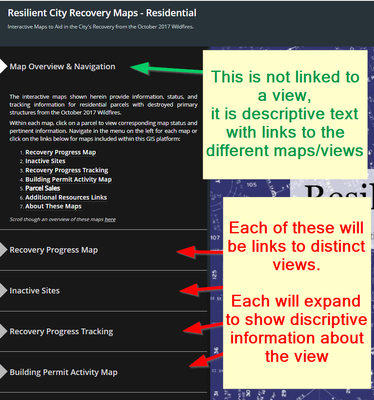
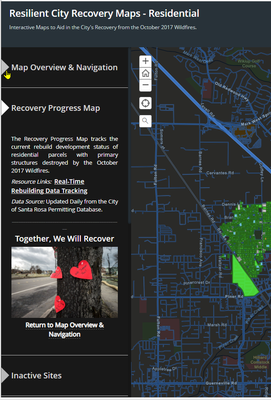
My existing Classic Map Series has a left side pane for navigating between the different maps (see screen captures below). In addition to navigation, the left side pane also provides descriptive context for each of the maps. I do not know how to recreate the same user experience in a new web app, specifically I'm hoping for help recreating the 4 functions listed below.
Below are the functions that I need to replicate from the existing map series app over to the new web app:
- User navigates between different maps via selecting items from a fixed pane on the left side.
- clicking a map in the navigation jumps to the map
- clicking a map in the navigation expands to provide a description & branding image.
- some of the items in the navigation pane are not linked to a map, instead they expand to provide descriptive text (e.g. items: Map Overview & Navigation, Additional Resource Links, About These Maps)
I am generally familiar with Sections & Views in Experience Builder, however, after significant web searches its not clear that is is possible to configure similar user experience in the Experience Builder.
Below are some screen captures to clarify what I am needing to replicate.
Thank you in advance
*Note: I posted this question previously in the Experience Builder community but have not received a response: https://community.esri.com/t5/arcgis-experience-builder-questions/view-navigation-with-descriptive-text/m-p/1670306

