Select to view content in your preferred language

Water isolation trace: one valve (same as others) is omitted from results

256
7
Jump to solution
2 weeks ago
Andy_Morgan
Frequent Contributor

My problem: After recently deploying our water UN, and having already walked through an isolation trace to make sure it works (including tracing/updating the full System tier), I went to a random area to walk through trace settings. Although 3 System valves were selected in a typical isolation trace, I discovered one valve was missed in the trace. It's not easily explainable. I've checked z-values (all valves are set to 0), made sure it's selected using a "CONNECTED" trace (which it is), and checked attributes. There is nothing that stands out as to why isolation tracing won't see this as a barrier.

I've tried these two settings for Filter Barriers, but neither makes any difference

Category Is equal to Specific Value Isolating
Asset group Is equal to Specific Value 2

(under network properties, I checked that System valve / System has "Isolating" under "Category" column)
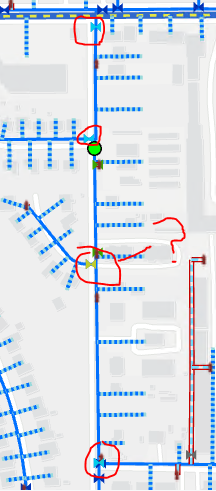
Water_UN_isolation_trace_valves_selected_map.png

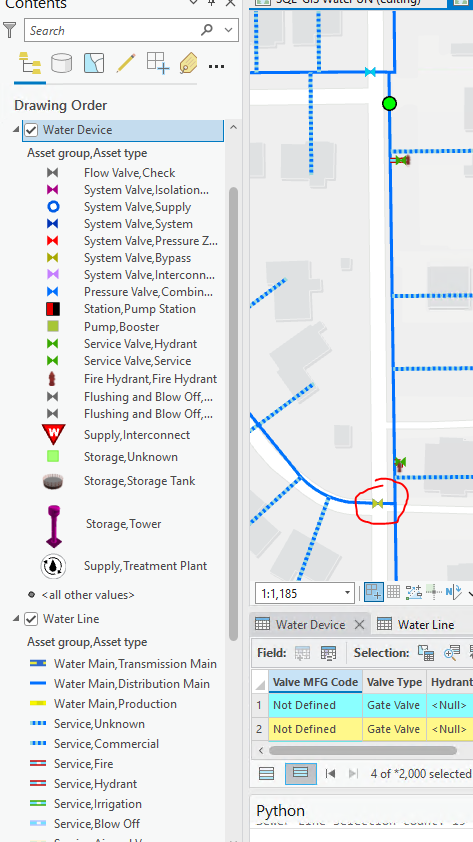
Water_UN_isolation_trace_valves_selected_map_zoomed_in.png


To be clear, the yellow highlighted valve is what I've selected in the map. It's a System / System valve, not a System / Bypass valve (similar yellow in legend). It's yellow because I highlighted it. All 4 valves are identical in terms of attributes that matter for UN connectivity and tracing. There is nothing special about this one valve, it's like many others. The lines on either side show z-values of 0 as well. I cannot find anything unusual about this random little area.

It has me concerned we cannot trust the tracing results if I happened to notice this, which otherwise I would have trusted is going to produce accurate results. 

Water_UN_isolation_trace_valves_selected_attributes.png


Tags (3)
0 Kudos
1 Solution

Accepted Solutions
PatrickGCowan
Esri Contributor

That valve is not required to isolate the area from pressure, which is why it was not selected. During a shutdown, the field crew may choose to close it to prevent draining the area, but that is an operational decision, not an isolation requirement.

It is an isolated valve, not an isolating valve.

View solution in original post

7 Replies
MikeMillerGIS
Esri Frequent Contributor
What do the results look like if you return all isolated features?
0 Kudos
Andy_Morgan
Frequent Contributor

It selects the valve when Include Isolated Features is checked. So it's going right past this device feature. It's just odd, because this is one of over 21,000 valves with Asset Group = System, Asset Type = System. I didn't edit this feature. It's showing as having a last modified date the same as nearly every other valve which is the day we migrated over last month. That's why it has me nervous. If this seemingly random one is overlooked, then why are the others getting selected when spot checking so far.    


Water_UN_isolation_include_all_features.png


0 Kudos
PatrickGCowan
Esri Contributor

That valve is not required to isolate the area from pressure, which is why it was not selected. During a shutdown, the field crew may choose to close it to prevent draining the area, but that is an operational decision, not an isolation requirement.

It is an isolated valve, not an isolating valve.

Andy_Morgan
Frequent Contributor

Thanks Patrick (and Mike). You both are of course right in the overall sense. I cannot argue with what you're saying and how isolating works in this case. I seem to have forgotten "isolation" traces are about the network as a whole (from sources outward to dead-ends, essentially). In real life, though, I'm assuming our Field Operations staff would want to turn off this cul-de-sac valve along with the others for fully isolating the pipe segment(s) involved, but that's an internal question I have for engineering and operations management.  

0 Kudos
MikeMillerGIS
Esri Frequent Contributor

Ok, that picture helps.  That valve is isolated by closing the other valves.  So to isolate that area, that valve going into the cul-de-sac does not need to be closed.  Now field operations, might choose to close that value, so the pipe is not drained and then does not have to be disinfected.  But that valve is not required to be closed to isolate the area.

MikeMillerGIS
Esri Frequent Contributor

BTW, if you want that valve in the results, you can use a Find Connected Trace instead of the Isolation Trace.

Andy_Morgan
Frequent Contributor

Ah yes, so simple. Using "Connected" for the type, I then refined my barrier conditions and for output specified I only want certain valve asset groups / types. The final selection was only a set of valves and nothing else. Seems like this accomplishes the goal. Thanks!

0 Kudos
