Hello,
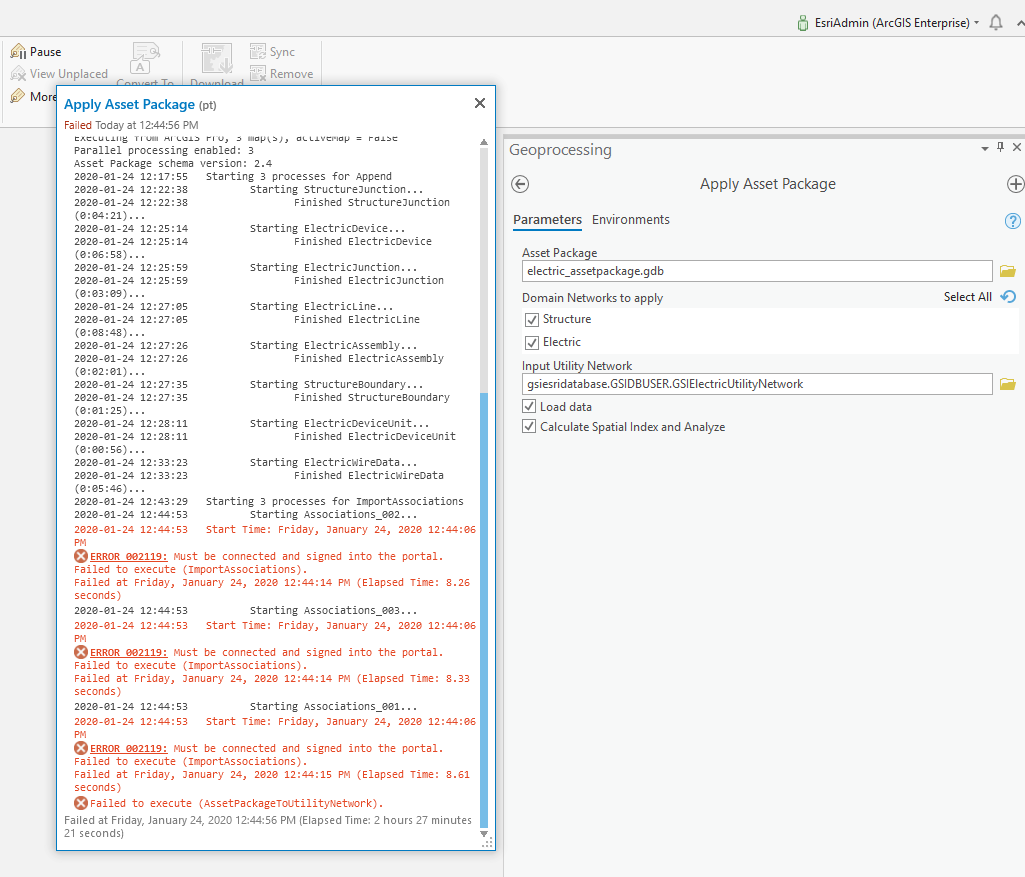
I'm in the process of setting up a new Electric Utility Network environment using the Electric Utility Network Foundations asset package and I'm running into an error when I'm applying the asset package to our enterprise geodatabase using the "Apply Asset Package" Geoprocessing tool. The error is "Must be connected and signed into the portal". I'm fairly certain I'm connected and signed into our portal and I've tried to do this a couple of times now and I've run into the problem both times now.
Any ideas would be very helpful.
Thanks,
Mike...
This will be resolved in Pro 2.5. The check for Portal user during Import Associations is removed.
It seems like there is something that is causing the connection to portal to timeout before the asset package import is completed successfully.
I have seen some cases where the import time is increased due to open maps in your project - have you checked to ensure there are no maps in your project open?
Apply Asset Package—Tool Reference | ArcGIS Solutions
Electric and Gas
Melissa,
Thank you very much for the response.
I just double checked and there are no maps opened in the ArcGIS Pro project we are using to run this Geoprocessing tool. It is basically just an empty project with 2 database connections – one connection to the asset package GDB and one connection to the enterprise geodatabase we are applying the asset package to.
Mike Hamsa
Chief Technology Officer - GeoSpatial Innovations, Inc.
P: 512-982-6735
Paul,
Thank you VERY much for the information – any idea when that release is going to be available, or if there are any workarounds we can use now in 2.4 to get past problem? We are kind of stuck right now and we’d like to get this environment setup so we can continue with our development.
Thanks again,
Here's a post on the release date
https://community.esri.com/docs/DOC-13641-arcgis-pro-roadmap-july-2019?commentID=82074#comment-82074
There's a uniquely named "AP_Workspace" folder in the same directory as the asset package. There's a python script in there called "main.py" -- you can comment out the steps that have already succeeded and just run the remaining.
Something like this:
So what happening on my machine is that I go to the AP_Workspace folder, modify the main.py and comment out the steps that have already completed, then run the Apply Asset Package geoprocessing tool again. When I do that it creates a new AP_Workspace# (1, 2, 3, 4, etc, based on the number of time I run it) and it copies the original main.py script file in that new AP_Workspace folder with all the steps back in it.
I get the feeling I’m doing something wrong.
Do I need manually run that main.py script with the python console after I modify it?
The AP_Workspace is essentially an artifact from ApplyAssetPackage.
Correct, you just need to run main.py standalone. See Run stand-alone scripts—ArcPy Get Started | ArcGIS Desktop
I’m not sure, but it looks like we’re getting the same error after I comment everything out up to ImportAssociations.
“Must be connected and signed into the portal”
(arcgispro-py3-clone) C:\Users\EsriVmAdmin\AppData\Local\ESRI\conda\envs\arcgispro-py3-clone>propy.bat C:\Users\EsriVmAdmin\Documents\ArcGIS\Packages\ElectricUtilityNetwork_1f52e2\p20\AP_workspace\main.py
ImportAssociations
1/18
Traceback (most recent call last):
File "C:\Users\EsriVmAdmin\Documents\ArcGIS\Packages\ElectricUtilityNetwork_1f52e2\p20\AP_workspace\main.py", line 21, in
return lambda args: val(gp_fixargs(args, True))
arcgisscripting.ExecuteError: ERROR 002119: Must be connected and signed into the portal.
Failed to execute (ImportAssociations).
Hmm, can you try with Pro open and authenticated with your Portal?
Or, you can add the following line after `import arcpy`:
arcpy.SignInToPortal('<url>', '<user>', '<pass>')
SignInToPortal—ArcPy Functions | ArcGIS Desktop
I got it to run through – I think I see what the problem was.
I used the ArcGIS Enterprise Cloud Builder v10.7.1 for Microsoft Azure to provision a new ArcGIS Enterprise environment. When I was setting up the servers I choose to use a self-signed certificate - which works well for the most part but when you connect to it from ArcGIS Pro you always have to answer that question “Do you trust this cert.” That’s perfectly fine for this development environment.
Yesterday when I was trying to add the step in the script file to SignInToPortal, I could not get it to connect – it would error out every time I ran it. I tried a number of different URL combinations and it would never connect successfully.
So, I went ahead and just installed that self-signed certificate into Trusted Root on the desktop machine I was using (so the machine would trust that cert by default) and everything ran perfectly. I was able to complete the steps for the script that Applies the Asset Package to my enterprise geodatabase.
I think I’m going to just start over again with a fresh enterprise geodatabase, stage the utility network and apply the asset package using the geoprocessing tools in ArcGIS Pro to see if that resolves the problem from there – I have a feeling it will. If not I’ll just finish it off with the script again.
Thanks for the help.
Signed in members can post, follow updates, and more. New here? Register a free account.
Find useful guides, FAQs, and documents to help you navigate and make the most of Esri Community.