Select to view content in your preferred language

Translate survey text response to English in feature layer?

223
2
Jump to solution
11-06-2025 06:53 AM
AdamGebhart
Frequent Contributor

I am working on a survey that includes translations to Spanish, French, Arabic and Swahili.  I have the labels, hints, etc all set up for those and they appear to work fine.

I asked somebody to submit a response in French and noticed that the values are stored in the feature layer in French.  Is there a way to automatically translate them so I only see English answers in the feature layer?  I've set up a report template and Power Automate flow that sends a report and the ideal situation is to not have the recipient spend any time translating.
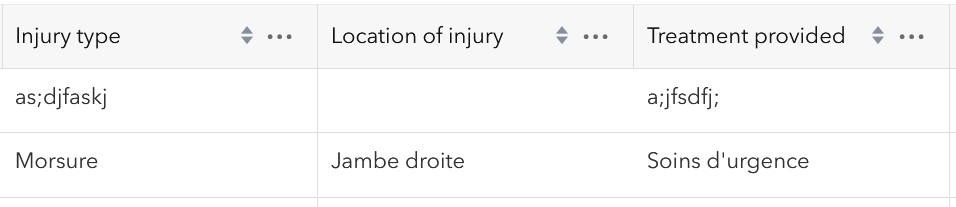

AdamGebhart_0-1762440542008.png


Tags (2)
0 Kudos
1 Solution

Accepted Solutions
ZhifangWang
Esri Regular Contributor

You can try the beta text analysis feature:

  • Add a hidden text question to hold the English translation.
  • Set its calculation as "text analysis" from the French text question, use a prompt like "Detect the language of the input text. If it's not English, translate the text into English and only output the translation result."

In this case, once the user complete inputting the French text, it will automatically translate to English and save to the hidden text question.

View solution in original post

0 Kudos
2 Replies
ZhifangWang
Esri Regular Contributor

You can try the beta text analysis feature:

  • Add a hidden text question to hold the English translation.
  • Set its calculation as "text analysis" from the French text question, use a prompt like "Detect the language of the input text. If it's not English, translate the text into English and only output the translation result."

In this case, once the user complete inputting the French text, it will automatically translate to English and save to the hidden text question.

0 Kudos
AdamGebhart
Frequent Contributor

@ZhifangWang Thank you for the tip.  With the help of Support I was able to implement this in Connect and get the translation(s) to work.

For others wanting this you for sure need to go log into Survey123 and select Organization > Settings > Extensions > turn on Enable the Survey123 assistant

AdamGebhart_0-1763142682476.png

AdamGebhart_2-1763142713049.png

AdamGebhart_3-1763142750099.png

AdamGebhart_4-1763142820857.png

You may also need to log into ArcGIS Online and select Organization > Settings > AI Assistants > turn on 'Allow use of AI Assistants...'

AdamGebhart_5-1763142910269.png 

AdamGebhart_6-1763142932908.png

AdamGebhart_7-1763142964586.png


AdamGebhart_8-1763142983924.png