I'm trying to use placeholder text in a survey made with Survey123 Connect. I set it up as I'm supposed to, putting the text I want ("Project Schedule" in this example) in the "hint" column and then putting "placeholderText=@[hint]" in the "body::esri::style" column. When previewed in the Survey123 Connect app it looks fine, like so:

DHCDAnalysis2_0-1758134157330.png
But when I publish the survey and view it in a web browser, which is how I want my users to view it, the placeholder text is now outside of and above the text box:
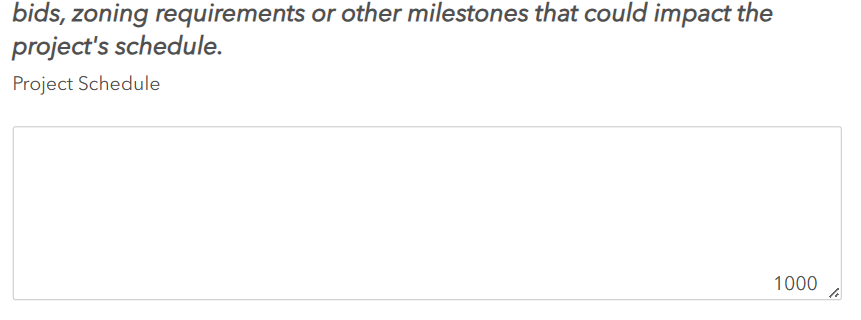
DHCDAnalysis2_1-1758134223308.png
Why is this happening? Is this a bug or am I doing something wrong?

I'm having the same issue. Did you find a solution for this problem?
I am also having this issue.
And not only this issue. Several times now I developed something in survey123 connect and the survey123 connect App is suggesting everything is working fine. When I publish the survey it also works in the survey123 App. But when I open it in the Survey WebApp things do not work anymore!
This is so frustrating, time consuming and annoying! And I ask myself: ESRI: do you even test your software? And if you do? Do you actually care? To me it seems you give a ....
As an example I tested for date and time. In Survey123 connect App und in the survey smarphone App everything worked as expected. But not in the WebApp. Luckiliy German ESRI Support helped me by providing some code snipped which converted the time format and it was working.
ESRI: Where is quality control?!?!
ESRI: Why dont developers handle this problems?!?!
ESRI: Do you even care about the quality and stability of your software?!?!

