We’re pleased to announce the September 2025 update to ArcGIS Survey123. This release delivers powerful enhancements to the Survey123 website, making it easier than ever to design, manage, and share surveys.
- Web Designer: A New Experience
- Web Designer: Create Forms from Existing Feature Layers
- New Templates Featuring Grid Layouts
- Other Enhancements and bug fixes
- Try the Next Generation Survey123 Field App
Web Designer: A New Experience
The Survey123 web designer has been reimagined with a cleaner, more intuitive interface. The new panel‑based configuration workflow gives quick and easy access to the items needed when drafting or modifying a Survey123 form design. The new left-side panel now hosts menu tabs for Add, Appearance, Options, Language, and Modify Schema. This multi-panel design might look familiar if you have used the ArcGIS Map Viewer, Experience Builder, or Field Maps Designer.
Panel Based Configuration
After adding questions to your form design the right-side panel gives you quick and easy access to the properties of the selected question.
By moving the Language and Modify Schema options to a more prominent location we have made them easier to find and access throughout the form design process.
We feel that these enhancements truly streamline the entire experience and will increase user productivity and enjoyment when using the web designer.
Web Designer: Create Forms from Existing Feature Layers
Have you ever wanted to use ArcGIS Survey123 to capture data for an existing feature layer? Maybe your team manages authoritative datasets with a predefined schema to maintain consistency across your system of record, and you would like to build a form based on those datasets.
We’re excited to announce that you can now build surveys directly from existing feature layers in the web designer—a capability previously available only in Survey123 Connect for desktop.
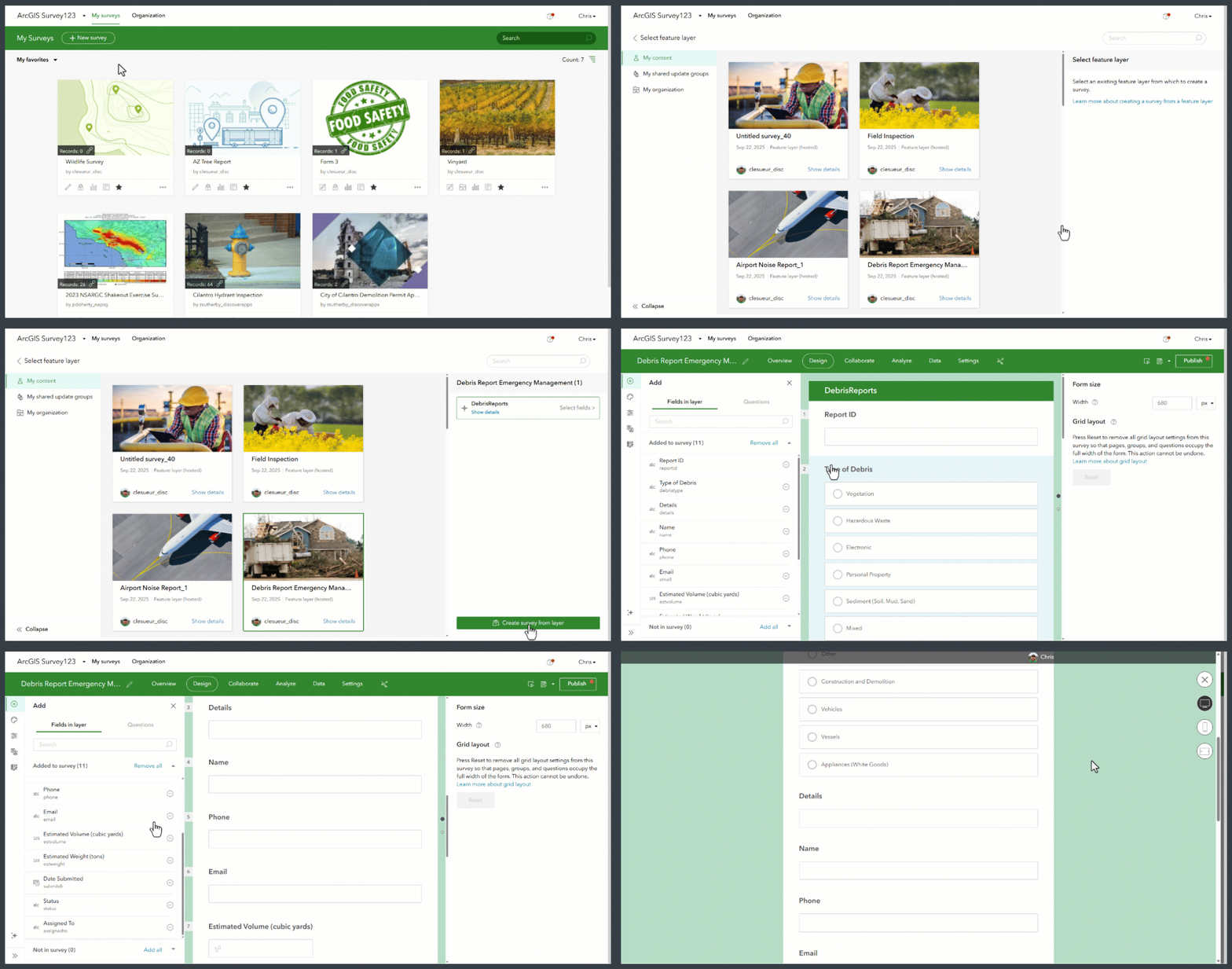
This feature is especially useful for organizations that manage items such as infrastructure, assets, or environmental data and want to collect updates or inspections directly into their existing layers. The feature will help ensure responses align perfectly with your existing GIS data model. And it will help streamline form creation workflows by eliminating the need to manually recreate fields and properties.
New Templates Featuring Grid Layouts
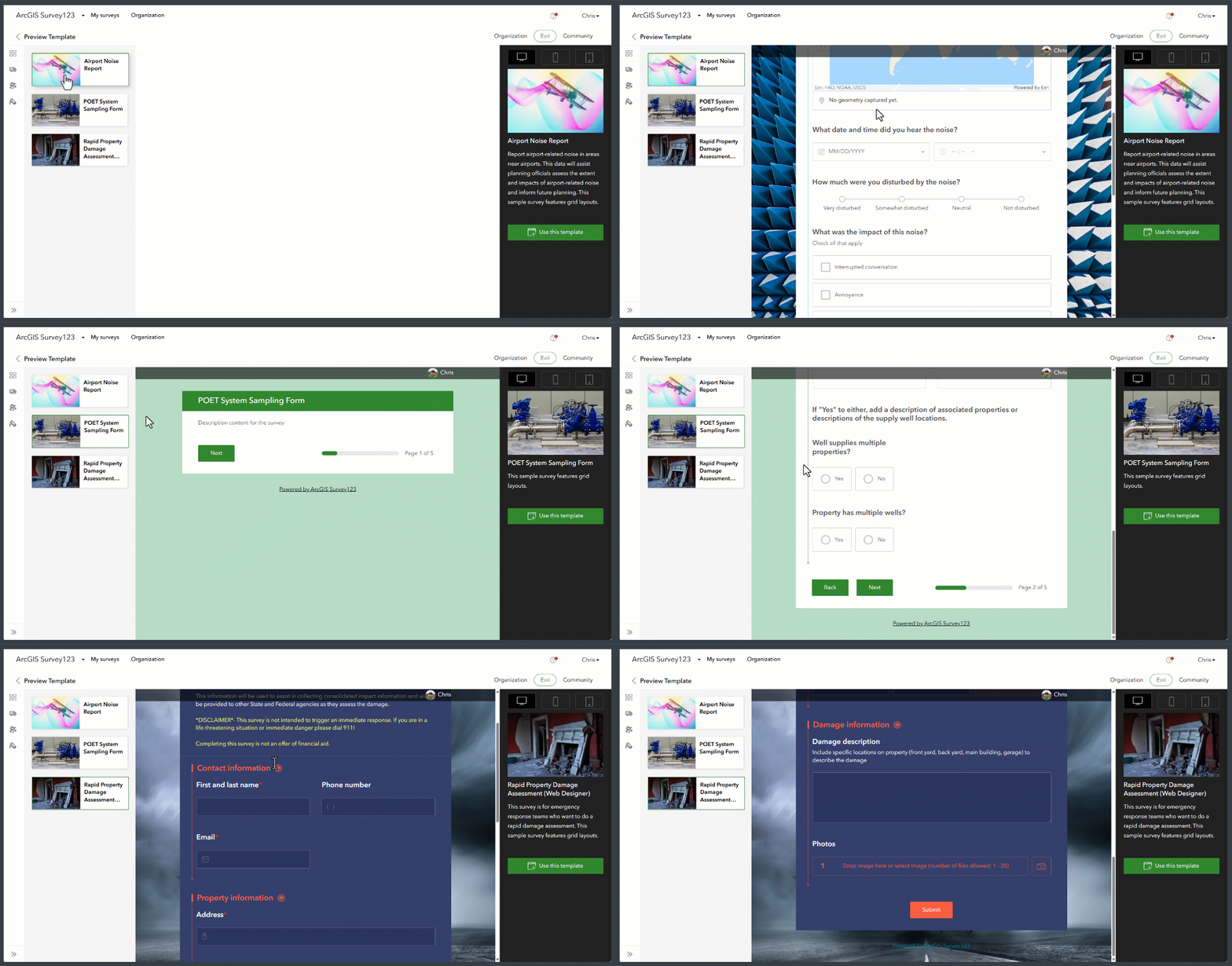
Over the past year, Survey123 introduced grid layouts in the web designer, giving you the ability to define columns within pages or groups and control question spans for side-by-side placement. This makes forms more structured, easier to navigate, and reduces unnecessary scrolling.
With this release, we’ve updated three templates to showcase the power of grid layouts. These templates are designed not only to demonstrate how to technically implement grids but also to inspire you with what’s possible when creating beautiful, user-friendly forms.
We can’t wait to see the creative and streamlined Survey123 forms you build using grid layouts on the web!
Other Enhancements and bug fixes
Field App and Survey123 Connect
Security Fixes: The Windows versions of the Survey123 field app (version 3.24.21) and Survey123 Connect (version 3.24.30) received a critical security update addressing a potential vulnerability (CVE-2023-4863) View this article for more information
Survey123 Assistant Enhancements
You can now edit previously sent messages to correct typos or improve prompts.
The Note question type is now supported, giving you more flexibility in guiding respondents.
Website and Web App
Expanded Calculation Support: More question types now support authoring calculations, allowing for smarter, more dynamic forms.
Enhancement: Added a note as a warning for “Share results” mentioning the restrictions of ‘What can viewers do” in ArcGIS Online Survey 123 Web Designer ‘Collaboration’ tab
BUG-000179166 The error message “Survey contains errors” appears at the top of a page that includes a required question dependent on the value of a question from the previous page
BUG-000178954 The required questions with a relevant expression immediately display a warning message before submission in ArcGIS Survey123 Web.
BUG-000168476 The survey embedded in ArcGIS Experience Builder using the Embed Widget does not load if the ArcGIS Survey123 form and feature layer are not shared publicly
Report Service
BUG-000162592 When using the ‘WHERE’ clause within ArcGIS Survey123 report template, filters set from Data tab in ArcGIS Online are not honored
BUG-000158084 Feature reports for surveys hosted in ArcGIS Enterprise fail to generate when a template contains an expression with the ‘stats’ method
Try the Next Generation Survey123 Field App
Looking ahead, we’re excited to invite you to explore the next-generation Survey123 mobile field app, now available in public beta. This new experience is built from the ground up to offer a modern, responsive interface with enhanced performance and accessibility.
Join the public beta to…
- Preview the new design and features.
- Provide feedback directly to the development team.
- Help shape the future of Survey123.
Review this blog post for more information and be part of the Survey123 evolution.
Or jump straight into testing via https://earlyadopter.esri.com/key/tnrtrffwjbt9nvqc


