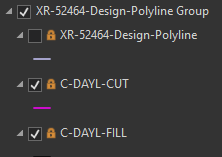
What is this orange lock button in the table of contents? I dragged and dropped a Cad drawing (.dwg) into the map, run model builder to delete a bunch of extraneous layers I don't need, now I see a bunch of orange locks on the Cad layers in the table of contents. It does this with 2 of the 3 cad drawings I'm working with. Right click Zoom to Layer is greyed out and when I go into layer properties and switch between the different items in properties ArcGIS Pro 2.6.1 crashes every time. Any Ideas? thanks Edit: I'm pretty new to GIS so maybe this is obvious but I searched and can find any documentation.