Select to view content in your preferred language

Pro 3.5.5 broke all our Arcade $datastore calls giving Object not found $datastore

1800
14
02-11-2026 08:18 AM
DougBrowning
MVP Esteemed Contributor

I think this was when we went to Pro 3.5.5 all of a sudden all our Arcade using $datastore in layouts in dynamic text broke.  We have tons of these.

We are getting

Object not found $datastore

on code that has worked for over a year at least.

Simple code here that calls to SDE.  Tried with and without SDE prefix etc.  Again this all worked for years.

FeatureSetByName($datastore, "I_Indicators", ['*'], false)

We had it nested under Filter but pulled it out for testing.  I do not see how datastore can not be valid?
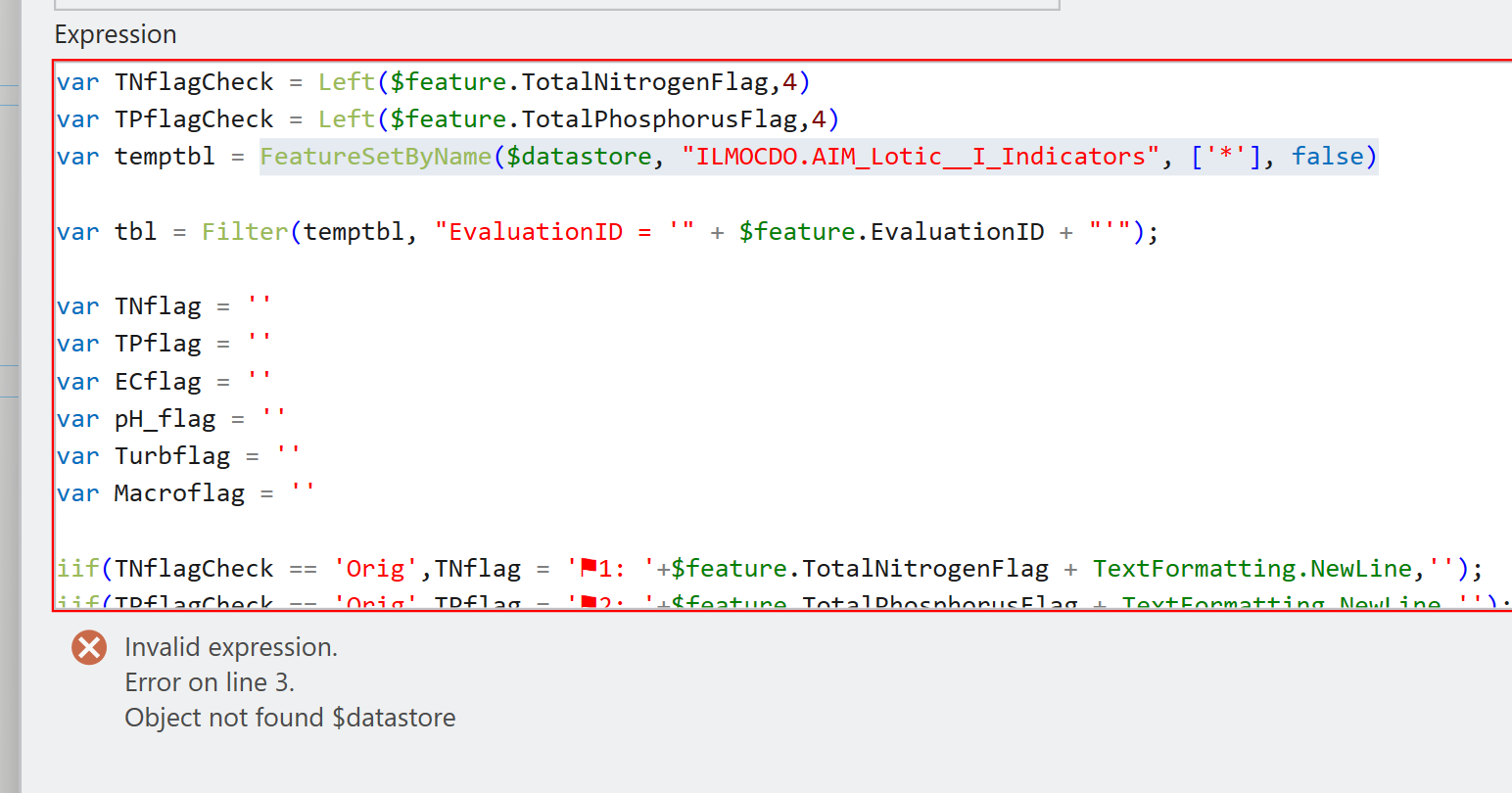
DougBrowning_0-1770826411104.png


Not finding anything at all out there on this.  Tried $map and does not work which I get.  But why is datastore suddenly gone?

Appreciated the help all our production stuff is now down so we are desperate.

thanks

14 Replies
Robert_LeClair
Esri Esteemed Contributor

One way to test if 3.5.5 "broke" the $datastore item is to uninstall 3.5.5 and revert back to 3.5.4 and then retest.

For Windows 10, you can uninstall the ArcGIS Pro 3.5.5 service pack by going to Control Panel->Uninstall a program->(top left) View installed updates->then click the ArcGIS Pro Patch 1 (3.5.5) and uninstall. 

For Windows 11, MS made it a bit more difficult, see image below:
Uninstall_Service_Packs.jpg

0 Kudos
DougBrowning
MVP Esteemed Contributor

Our computers are all managed we cannot do any of that.  Plus these all get called sever side in geoprocessing tools so changing one computer will not help.

Why would it be saying datastore is not valid?

Again all our production geoprocessing tools are now broke.  This is a very major issue for us.

thanks

0 Kudos
Robert_LeClair
Esri Esteemed Contributor

Okay - digging deeper, I believe this is BUG-000182720 - "Arcade expressions using FeatureSetByName($datastore, ...) fail to validate in layout dynamic texts in ArcGIS Pro, returning the error “Object not found $datastore.”  It's currently under review.  The issue is not reproducible in ArcGIS Pro 3.4 and earlier but 3.5 and above.

DougBrowning
MVP Esteemed Contributor

Well that is exactly what we are using.  Umm ok wow this is bad.  Any know workaround at all?  Like I said it took down most of our tools for 6,000 users.  So yeah its bad.

0 Kudos
Robert_LeClair
Esri Esteemed Contributor

In reviewing the Esri Support case logged 2/11/26, I do not see a workaround currently in the case documentation.  I understand that this is a high-impact bug to your organization and I wish I had an answer for you.  Although not a solution, I would contact Esri Support Services and have your organization's customer number associated with this BUG certainly. 

Again, not a great solution I know, especially with such a large organization, but uninstalling 3.5.x and reinstalling 3.4.x would allow those tools to work again.

DougBrowning
MVP Esteemed Contributor

@Robert_LeClair We did get one computer back to 3.3 and it all works again now.  We really, really need this fixed going forward.  Thank you

0 Kudos
CraigWilliams
Esri Contributor

The Arcade Layout profile (https://developers.arcgis.com/arcade/profiles/layout/) does not support the $datastore profile variable or the Data Access function bundle. Validation was updated at the 3.5 release to more strictly enforce profiles and this case that previously had been undocumented and unsupported behavior stopped working. Furthermore, in ArcGIS Pro 3.6 the code editor now includes profile-specific code hints to indicate when variables outside the scope of the profile are in use. We understand from your viewpoint that this is a regression in functionality, but execution of such scripts was accidental and as mentioned above unsupported and undocumented. Including support for feature set functions and profile variables such as $datastore may be considered for a future enhancement, but feature set functions are generally not included in drawing profiles due to performance impact. An alternative approach would be to perform the necessary computation in a calculation attribute rule and consume the calculated field.

AlfredBaldenweck
MVP Frequent Contributor

Interesting. Is the layout profile considered "drawing"? As far as I know, Arcade is really only available as dynamic text or table attributes in Layout.

DougBrowning
MVP Esteemed Contributor

These are for layouts that make dynamic text on the fly based on input from a custom geoprocessing tool.  So attribute rules would not work for that since the polygon is on the fly that is being summarized.  

So your idea will not work.  We need some way to grab data from other layers here please!  

Note this has been working perfectly for years and years so makes no sense to remove it now.  Esp with no alternative.  This is a HUGE deal for us as all of our Production tools are still broken.  We took one machine and downgraded to 3.3 to get us by but we just have to have this going forward.  We use it to look across 15 123 forms to create QA reports.  It has been a huge hit and we even won an Esri award for it.

I am super confused why time is being spent removing features here.  Please help  @CraigWilliams . 

Thank you