Hello,
In ArcGIS Pro 3.6.4, I have observed an issue while attempting to delete a child version from the 'Versions' window (data source --> Manage Versions). I am the version owner. I select the version row to be deleted, click the Delete command to indicate the row will be deleted (with the row being scratched out), and then click Save. I get a red indicator in margins of the version row and a message stating that the version is in use, even though it is not the current version:
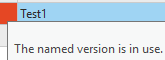
I noticed that this issue is already a documented bug, but ESRI states that it has been addressed. I'm encountering this issue at ArcGIS Pro version 3.6.4:
BUG-000152519: https://support.esri.com/en-us/bug/the-error-message-the-version-is-currently-in-use-is-re-bug-000152519
In addition, I am experiencing an intermittent issue when attempting to delete versions using the 'Delete Version' geoprocessing tool. The tool sometimes fails with a cryptic error message (ERROR 999999). Again, I am the version owner and it is not the current version:
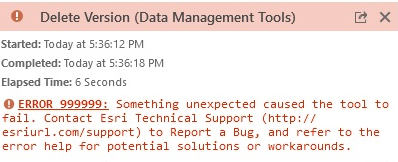
I was wondering if these two issues with deleting versions are related? The workaround suggested in the bug report works, but it would be nice if this was fully addressed in the software. Additional info below:
ArcGIS Pro 3.6.4
Oracle enterprise geodatabase v12.0.0
Traditional versioning
Thank you.