When I try to install python packages like 'seaborn' through the package manager in ArcGIS Pro 2.3.1, I can successfully able to do so, but I couldn't able to use the same package through Jupyter notebook (getting error ' No module - seaborn' message wherever i call seaborn inside Jupyter notebook. Why? ...is there anything am I missing here?
Any help?
I did clone an environment before adding a seaborn package. The only thing to me seems to be a problem that when I open Jupyter notebook it takes the same default environment (arcgispro-py3) instead of arcgispro-py3-clone1 where I have installed seaborn package.
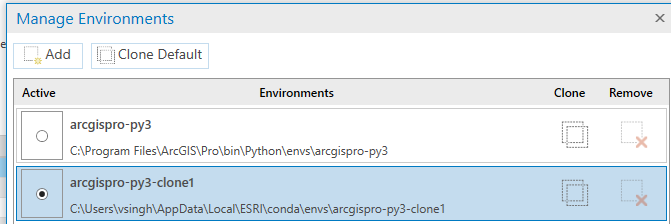

Hope I have clearly explained my problem above, if not please ask for it.


