Select to view content in your preferred language

How to change the upper value in symbology classes

162
2
Thursday
JakanMuratbekov
New Contributor

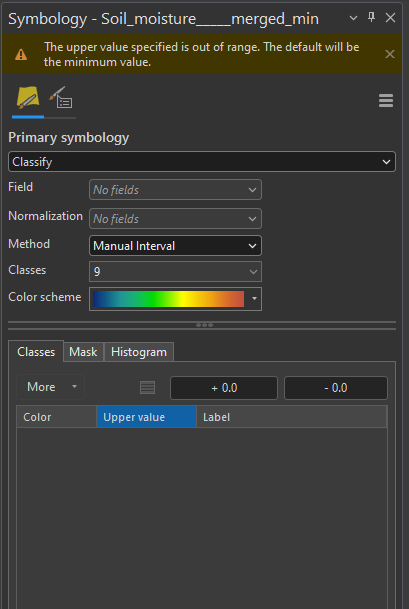
I'm a noob and I need help. I want to change the Upper Values of those classes but whenever I change the value, it does the following (see the second attachment). The values I need to insert is 0 up to 43.33. I know that the issue is with the numbers being out of range. Maybe there's a workaround or anything?
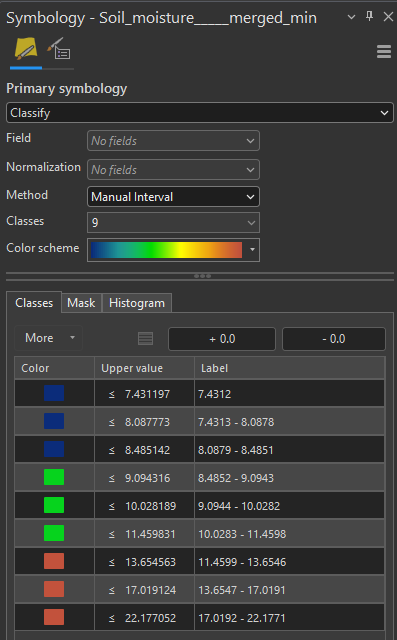
JakanMuratbekov_0-1764310170851.png

JakanMuratbekov_1-1764310207854.png


0 Kudos
2 Replies
DanPatterson
MVP Esteemed Contributor

this recent post describes what works for them

How to change the upper value in symbology classes... - Esri Community

or check the help

Graduated colors—ArcGIS Pro | Documentation

If it is a bug, then you should report it to Tech Support so that they can assess the case with your version, data and setup


... sort of retired...
0 Kudos
DuncanHornby
MVP Notable Contributor

You can tinker with the labels, so if your first break you want to be 0 to 7.4 then just edit the label to say that even though nothing in your data goes below 7.4.

0 Kudos