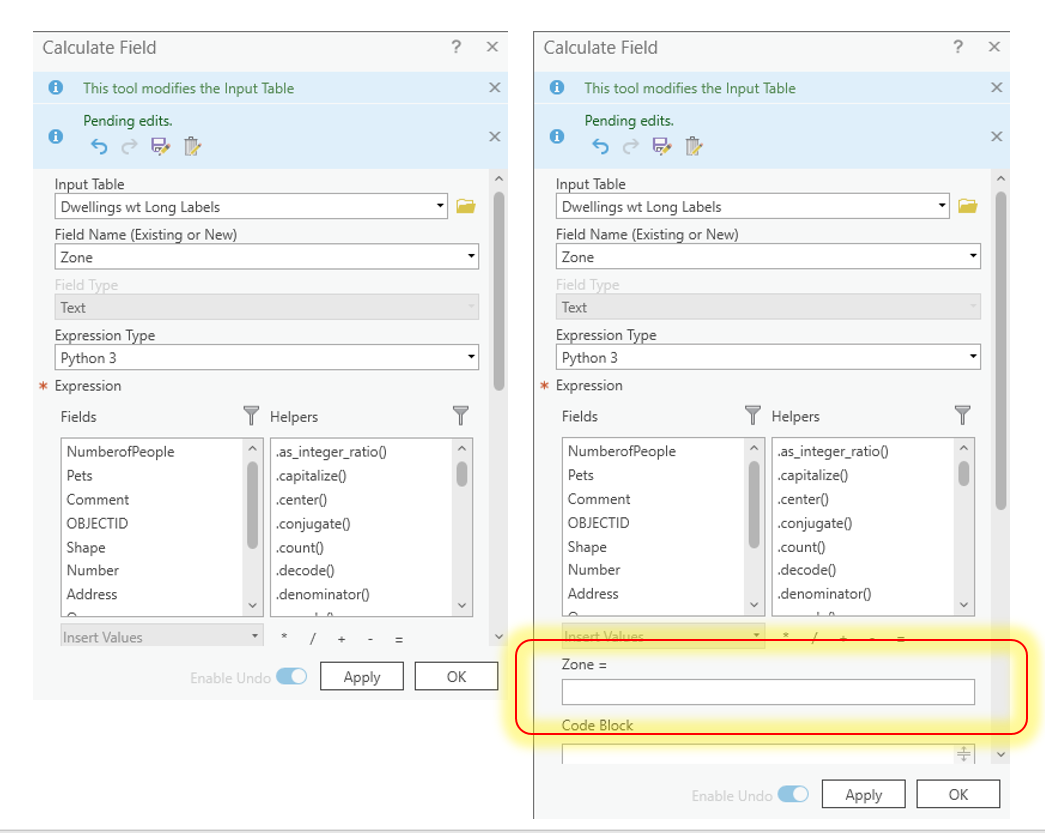
Currently, when you click the "calculate field" button to add a value in an attribute table, the GUI that opens is too short to show the box to type in the value,. See example below. The user therefore has to increase the GUI size to access the place to type or scroll down. This is rather cumbersome. Could the GUI be made so that it opens bigger (longer) by default so that resizing the GUI every time is not necessary?
The image on the left shows the GUI as it opens, while the one on the right is after it's been enlarged to show the portion to type.
@DanLee . Thanks for following up, and thanks @SamHudson for posting. I had not noticed the question.
This Idea has been implemented in ArcGIS Pro 3.1. Now when any pane, including the Calculate Field pane, is expanded it will be 'sticky' and retain its modified size when opened again.
Please see the What's New documentation for more new features in Pro 3.1.
The Ideas in ArcGIS Pro 3.1 blog will be wrapped up soon, highlighting all Ideas implemented in this release, including this one. Once complete, I will add the link to this comment.
You must be a registered user to add a comment. If you've already registered, sign in. Otherwise, register and sign in.


