Restore the ArcMap functionality to deselect and flash individual features in the List by Selection tab of the Contents pane.
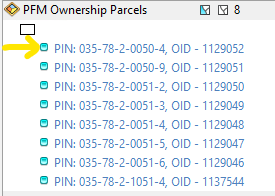
In ArcMap, up to 8 individual features would be listed underneath the layer in the List by Selection tab of the Table of Contents pane. Clicking on the text for the Display Expression would flash the feature in the map. Clicking the turquoise box to the left of the Display Expression text (arrow pointing to box in image below) would deselect the individual feature.
Currently, Pro only lists the layer (not individual features) and only provides the ability to deselect ALL features in the layer, not individual features.
I am aware that this can be done in the table for the layer. That is more complicated and cumbersome. Our users frequently rely on the ArcMap functionality. Please implement.
Check out the Attributes Pane and make sure that you have flashing turned on in Options->Navigation->Pop-ups->Show crosshairs when flashing
@AlfredBaldenweck, that does not allow for deselection though. Having flash and deselection in the same place as it was in ArcMap was extremely useful and efficient.
You can unselect individual features via the attributes pane as well by right-clicking.
@AlfredBaldenweck, thank you for the suggestion. That is somewhat useful. Unfortunately, that exposes the Attributes pane for editing attributes. Our application uses custom forms that enforce business rules and validation and we would prefer to not give the user access to the Attributes pane. The ArcMap implementation meant useful selection controls could be available without mixing them up with stock editing tools.
Also note that others have had similar concerns:
You must be a registered user to add a comment. If you've already registered, sign in. Otherwise, register and sign in.